CRM for real estate agencies and realtors
A realtor's leads come from every side at once: a call about a listing, an Instagram message, a question on OLX, «Telegram, please». A week later nobody remembers who asked what, what the budget was and when the viewing was agreed. ModalCRM gathers all requests in one queue, moves each client through a pipeline from first contact to a contract, and reminds you who is due a call-back. It has no object catalog, and we say so honestly below.
Every client request in one queue
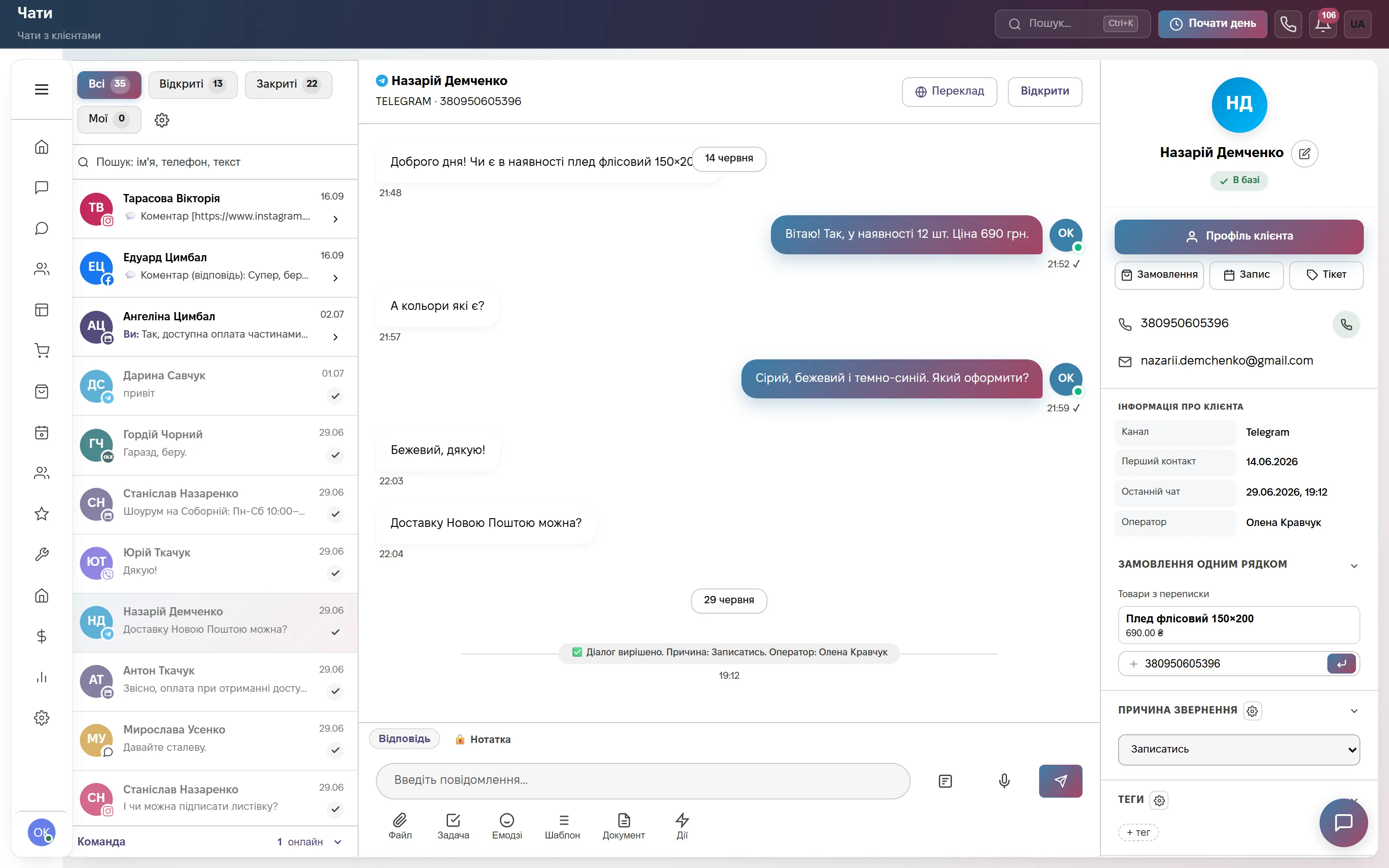
On the left is a chat list with the filters All, Open, Closed, Mine: Telegram, Viber, WhatsApp, Instagram, Facebook, email and a site chat, plus buyer messages from OLX. In the middle is the conversation, on the right the client card: «In base», channel, first contact, owner, the buttons «Order», «Booking» and «Ticket» and the «Reason for contact» field. For an agency it is a handy place to record: buying, renting or selling.
If the person is not in the base yet, press «Create lead» and the card appears with the data from the chat and the conversation. A chat can be handed to a colleague with «Transfer» and a comment on what is already clear. The system will not close a chat without a reason for contact, so over time you can see what clients actually look for.
Client pipeline: from request to contract
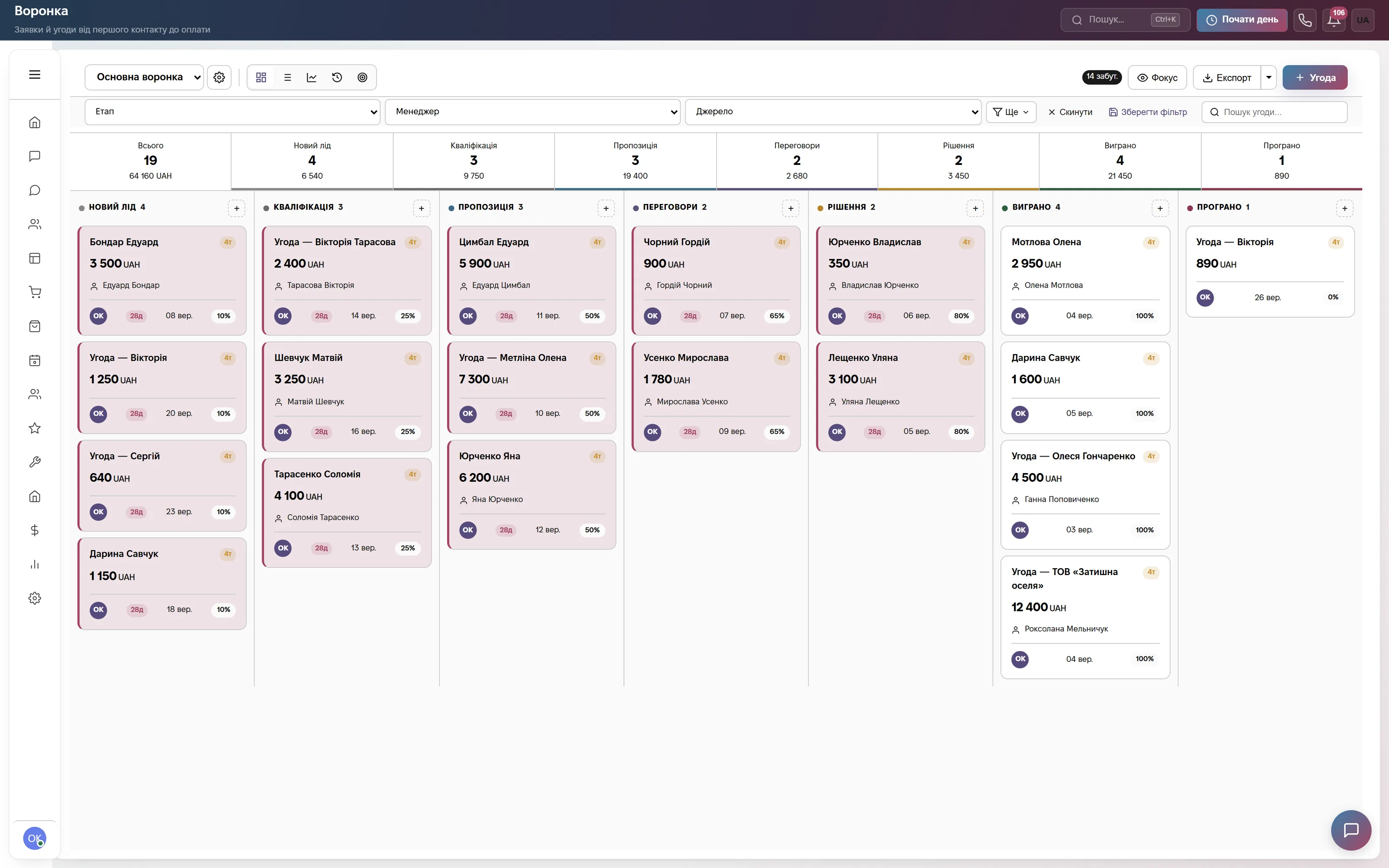
A kanban of deals with stages, amounts and percentages on cards, the initials of the responsible realtor, and the Stage, Manager and Source filters. The standard stages (New lead, Qualification, Suggestion, Negotiation, Decision, Won, Lost) can be extended with your own, with a name, colour and probability, for example «Viewing scheduled» or «Deposit». You can keep several pipelines, for instance separate ones for sales and rentals.
A client's requirements (district, rooms, budget, conditions) fit well into custom fields of a deal or a contact: the types include a dropdown, a multi-select, a number, a date and text. A loss is closed with a reason and a comment, and the card has a «History» tab showing who changed the stage and when.
Calls from listings without lost clients
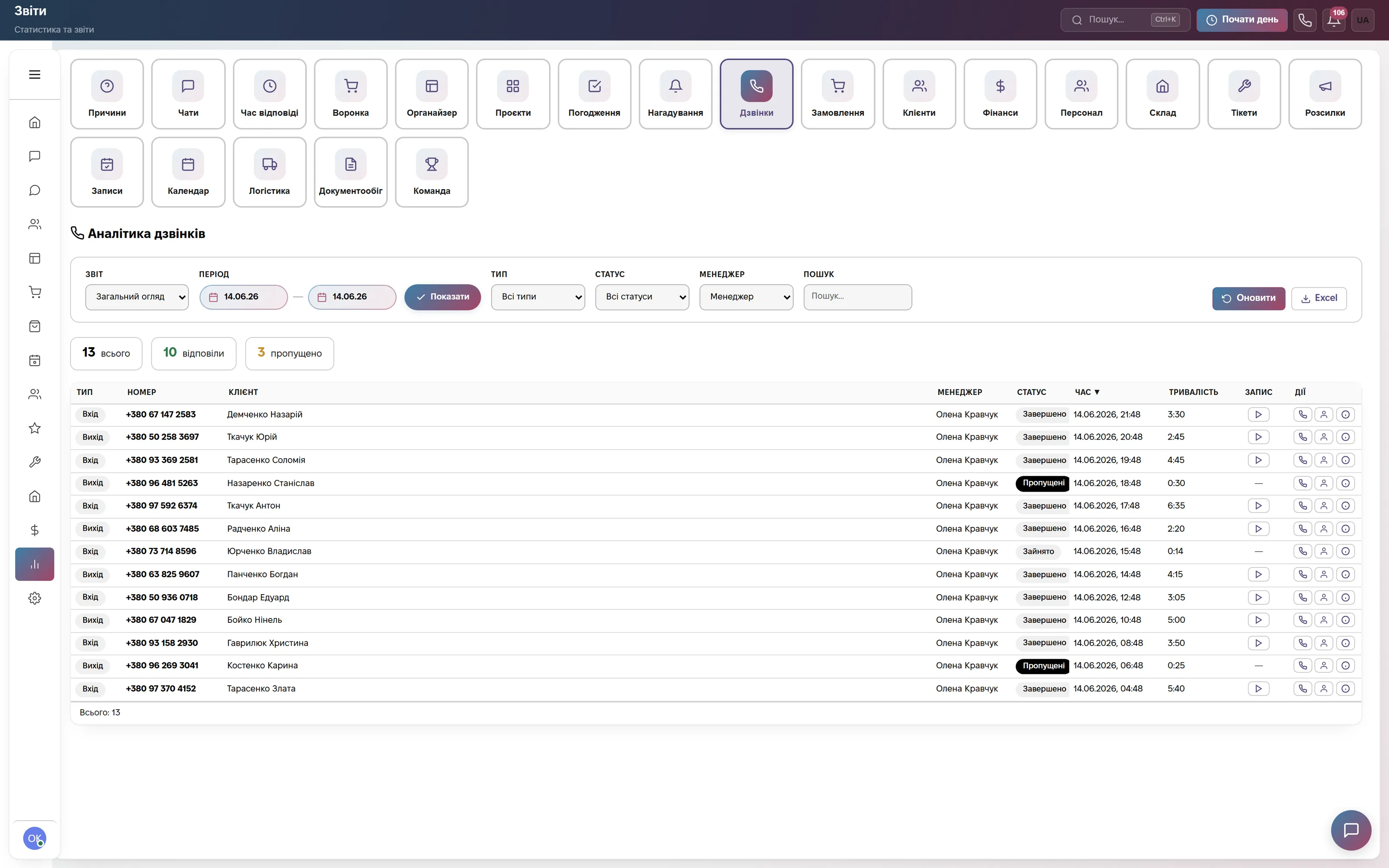
«Call analytics»: types, numbers, clients, managers, statuses and duration, a button to play the recording, filters and Excel. An incoming call shows right away who is calling and whether the person is in the base, and during the conversation you create a deal, a lead, a task or a calendar entry from the call window.
A missed call about a listing is a lost buyer, so CRM itself creates a «Call back» task with a two-hour deadline. Reports by managers and missed calls show which realtors really work the phone. A recording appears if your SIP provider enables it.
Home: which clients have gone quiet
The «Needs attention» block shows overdue tasks, chats without a reply for over an hour and deals with no activity for over 5 days; below is the «Deal stuck» feed with the client name and days without an update. In realty these are usually clients promised a selection of options who never got an answer.
A reminder can be set for any moment: «call back after the weekend», «ask about the mortgage decision». A task is linked to the client and the deal, and the reminder arrives in Telegram. Automatic reminders on stalled deals work for the standard pipeline stages.

Viewings in the realtors' schedule
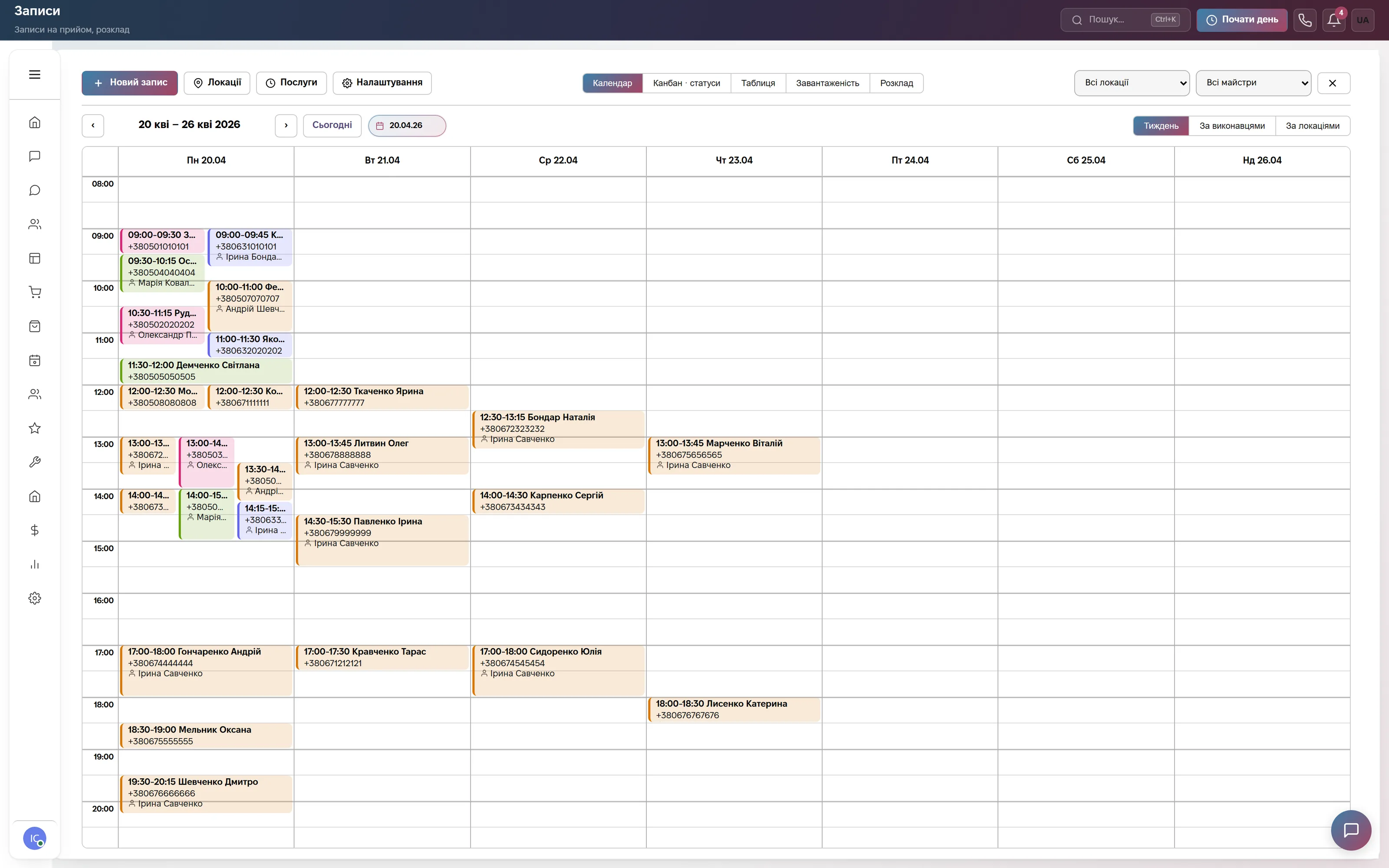
The «Bookings» module was built for salons and clinics, but its logic fits viewings: a «Viewing» service with a duration, a realtor as the performer, a location such as an office or an address. The screenshot shows a weekly calendar split by performers: the system will not put two clients on the same realtor at the same time, and a client gets a reminder in Telegram or SMS and a link to reschedule.
If you do not need a separate schedule, meetings are set in the calendar: participants, an external guest by email with an .ics invitation, reminders 5 to 60 minutes ahead, a Google Meet or Zoom link for an online presentation. You type the address of a specific property as text; there is no link to a catalog.
Which modules to turn on
What it costs
Site chat, messengers and a three-step bot. One user, 600 replies a month. Forever, no card.
A viewing schedule and client reminders, plus the deal pipeline, browser calls, chats and messengers, documents. Team of up to 3, then +200 ₴ per extra user.
All modules: also finance and invoices, HR, automations, orders and warehouse. Team of up to 10, then +200 ₴ per extra user.
Quarterly billing is 8% off, yearly 17% off. Rozetka, Prom and Nova Poshta integrations are not charged separately.
Frequently asked questions
Is there an object catalog with photos and matching to a client's request?
No. ModalCRM is a CRM for clients, not an object database: there is no catalog of flats and houses with photos, no matching of objects to a client's request, and no export to listing boards or multilisting. You keep objects where you are used to, and in the CRM you record the client, their requirements, conversations, calls, viewings and contracts.
How much does a CRM for a real estate agency cost?
The «Bookings» plan is 900 ₴ a month for a company of up to 3 users, each extra user +200 ₴; it includes the deal pipeline, calls, chats and a viewing schedule. If you keep viewings in the calendar, the «Communication» plan at the same 900 ₴ is enough. For a team of up to 10 there is «Everything included» at 2 200 ₴. A quarter saves 8%, a year 17%. The first 14 days are free, no card.
Do messages from OLX and social networks reach the CRM?
Yes, the chat section receives messages from OLX, Instagram, Facebook, Telegram, Viber, WhatsApp, email and the site chat, and you can reply without leaving the CRM. For WhatsApp and Instagram the 24-hour rule after the client's last message applies. Publishing or updating the listings themselves on OLX from the CRM is not possible.
How do I keep a buyer's requirements: district, rooms, budget?
Through custom fields of a deal or a contact: a dropdown, a multi-select, a number, a date, text, up to 50 fields per entity type, and a field can be made required. The realtor fills them in the card and sees the conversation and history next to them. The CRM cannot automatically compare these fields with your objects.
Can I generate contracts with a client?
Yes, in the documents module: you upload your own DOCX template with variables (full name, requisites and other data from the client card), CRM generates the file, numbers it and sends it by email or to a chat; the sending history stays in the card. You check the legal soundness of the templates yourself: there are no ready-made sale contracts in the system.
Gather the agency's requests into one pipeline
Connect messengers and telephony, set up your own stages and see which clients are waiting for an answer. 14 days of the full plan free, no card; the free plan stays forever.