CRM for a construction company and renovation crews
In a renovation company the client gets lost between the call, the site survey and the estimate, while the site budget lives in the foreman's Excel file. In ModalCRM leads from calls and chats go into a pipeline with your own stages, a site is run as a project with milestones, a budget and risks, crews get tasks, and materials are tracked in the warehouse. It is not estimating software and not a work schedule: see the answers below.
A call from a new client is not lost
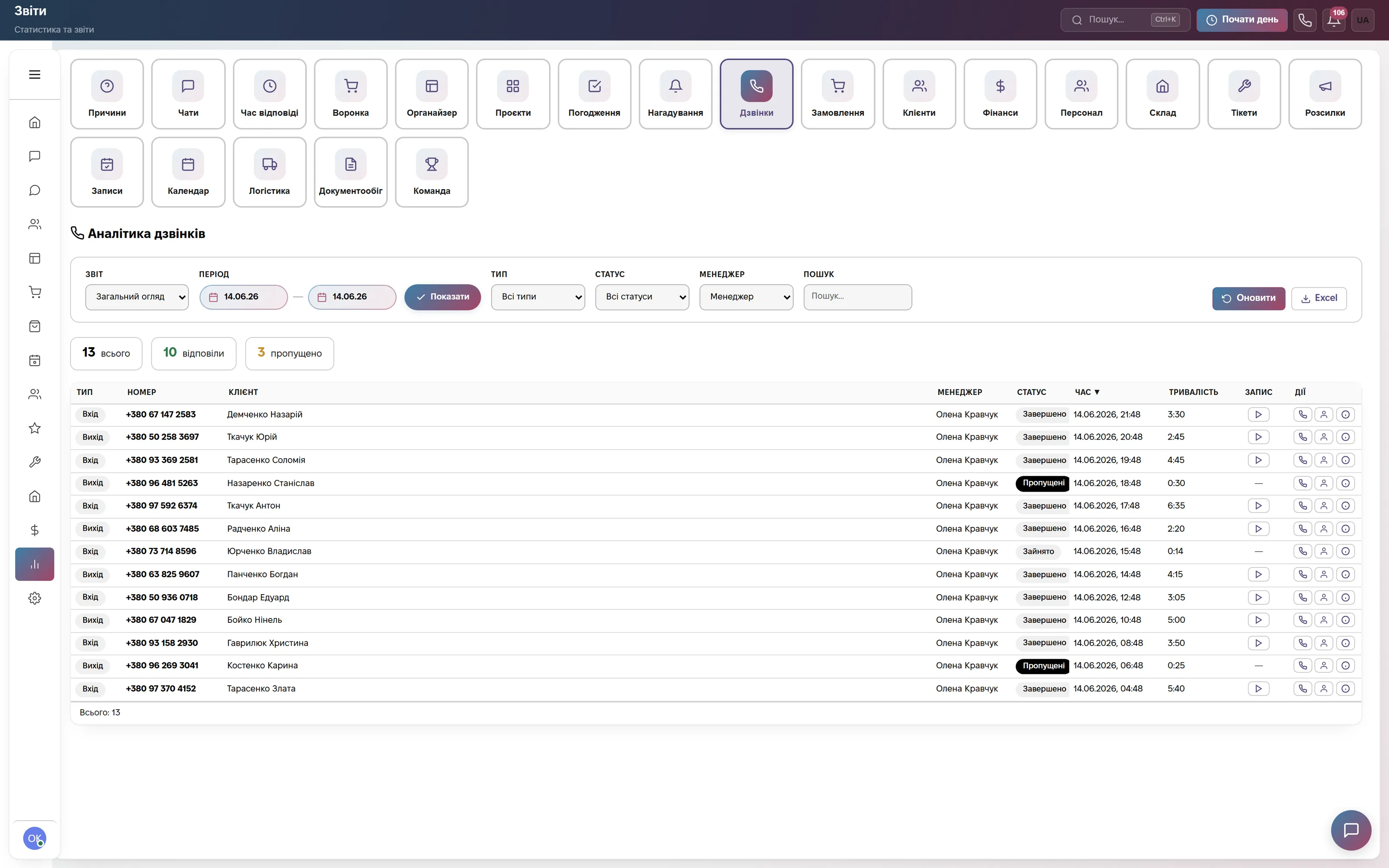
The Calls report shows the day's log: 13 calls, 10 answered and 3 missed. The table has type (incoming or outgoing), number, client, manager, status, time, duration and a button to play the recording. Calls are taken in the browser, and the report can be exported to Excel.
A missed incoming call turns into a Call back task with a two-hour deadline, so a client who asked about a renovation does not vanish. During a call you can create a deal or a task, and the card shows whether this is already your client. You need a contract with a SIP provider (Binotel, Zadarma, Ringostat, UniTalk, CallsApp or your own server). Messages from the website and messengers land in Chats.
The pipeline: from a lead to a contract
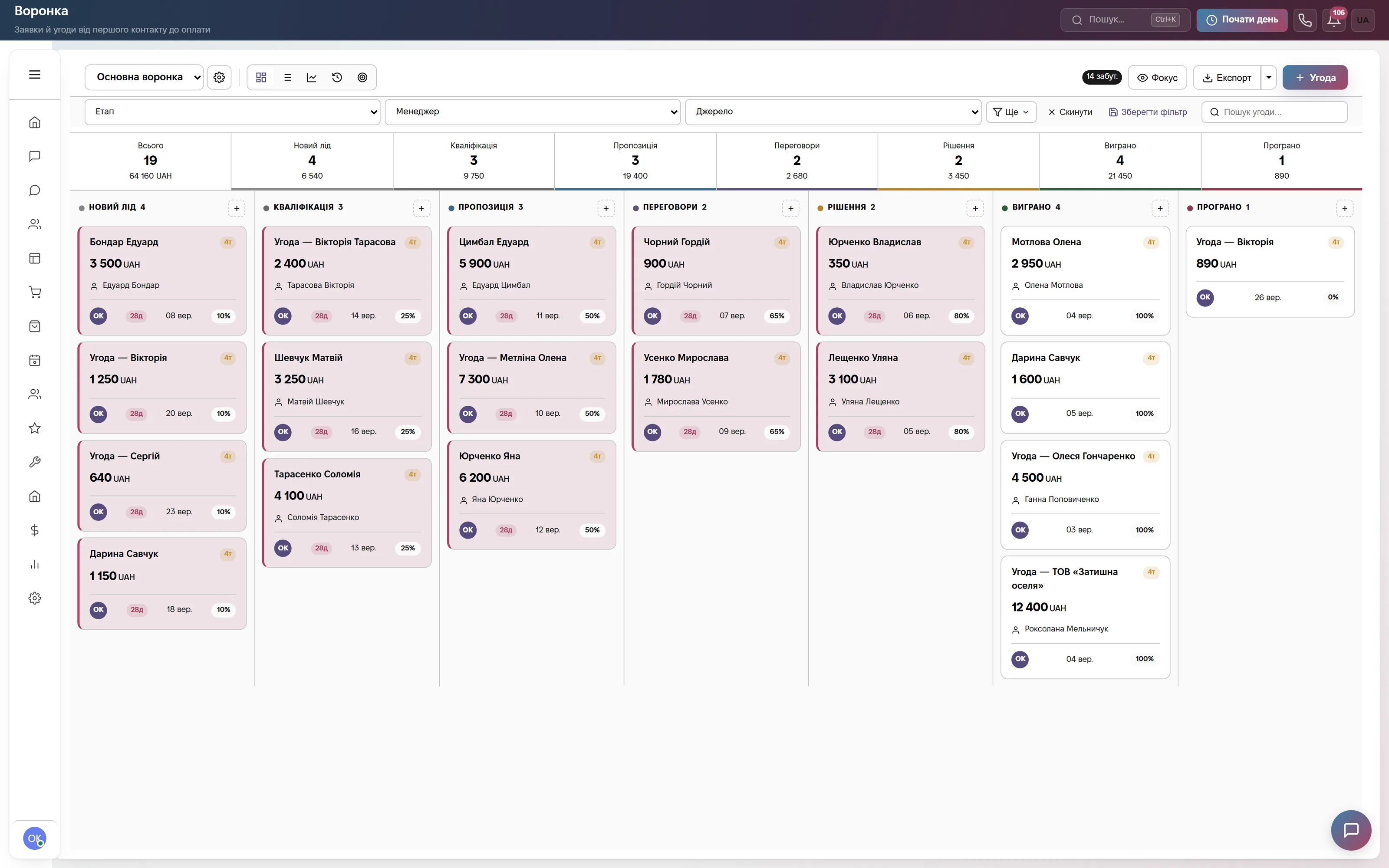
The Main pipeline kanban: 19 deals worth 64,160 UAH, with a count and a total above each column. Cards show the amount, client name, date and probability, with filters by stage, manager and source at the top, and the Export and + Deal buttons.
The default stages are New lead, Qualification, Proposal, Negotiation and Decision. You can rename them to fit your process, for example survey, estimate, contract, works, while Won and Lost stay as system stages. In a deal card the Event button plans a site visit in the calendar, Create invoice issues an advance in Finance, and Send document builds a contract from a template.
Sites, crews and approvals
Home shows where to look in the morning: Needs attention (overdue tasks, chats unanswered for over an hour, deals idle for over 5 days), Today with reminders, the cards Leads, Clients, Active chats and Active tasks, and a list of stalled deals.
A site is run in the Organizer as a project: foreman, deadline, milestones, a team with roles, a budget with expenses (a yellow indicator after 70%, red after 90%), documents with versions and a risk matrix. Crew tasks have the statuses New, In progress, Stuck and Done. A project can be saved as a template, for example a turnkey apartment renovation, and next time its tasks, milestones and risks are filled in for you. A contract or an advance goes through Approvals along a chain.

Materials warehouse and a reserve for the site
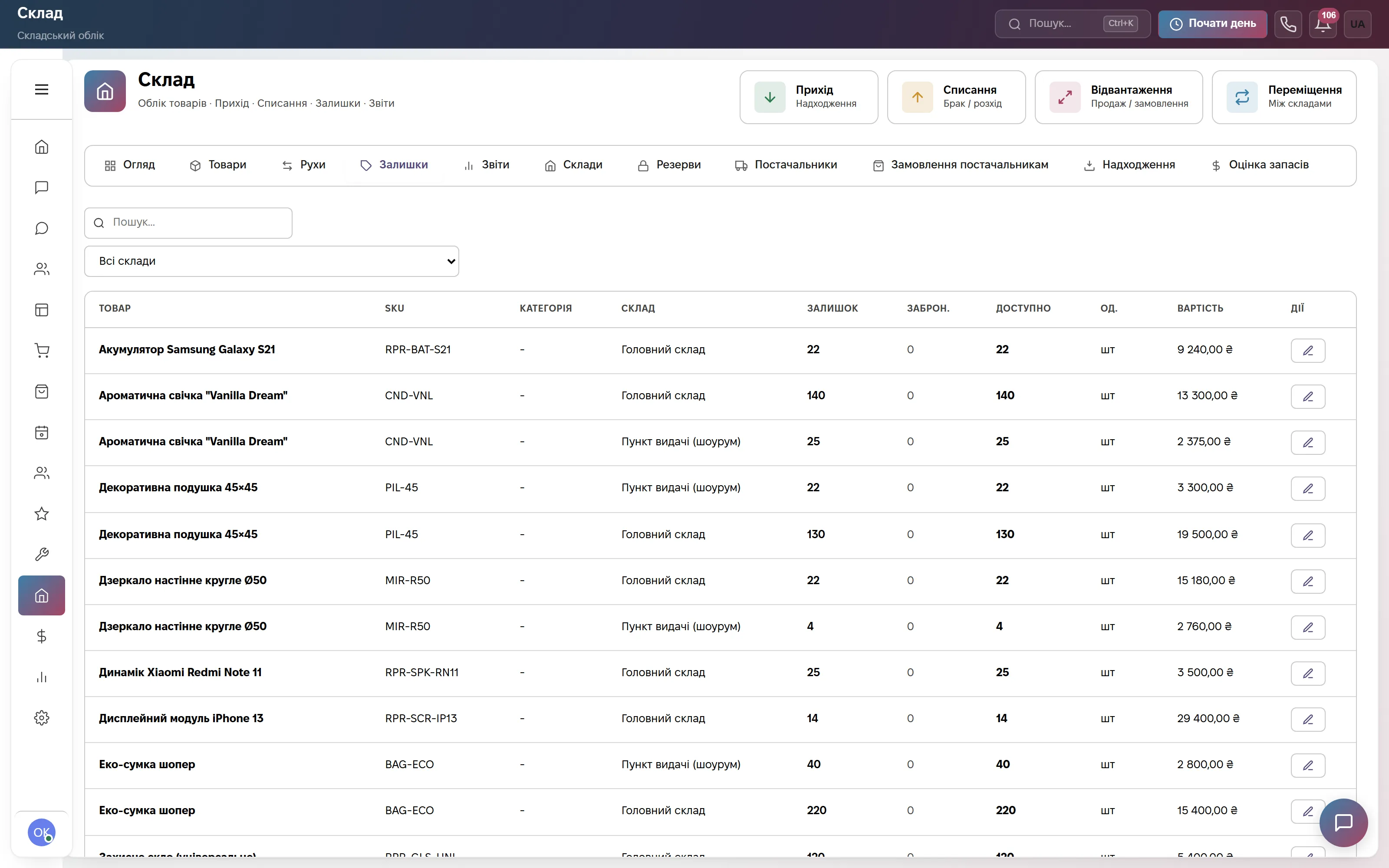
The Warehouse section has the buttons Receipt, Write-off, Shipment and Transfer. The stock table shows product, SKU, warehouse, Stock, Reserved, Available, unit and value. The screenshot has two warehouses, a main one and a pickup point, and the tabs lead to Reserves, Suppliers and Supplier orders.
For renovation work that means a central warehouse plus separate warehouses for large sites: materials move between them and a write-off is recorded as a movement. A minimum stock threshold warns you when it is time to buy. Items of a deal taken from the warehouse place a reserve, so Reserved shows what is already set aside for an order. A write-off is not tied to a project: the warehouse does not see which site the material went to.
Finance: advances, purchases, crew pay
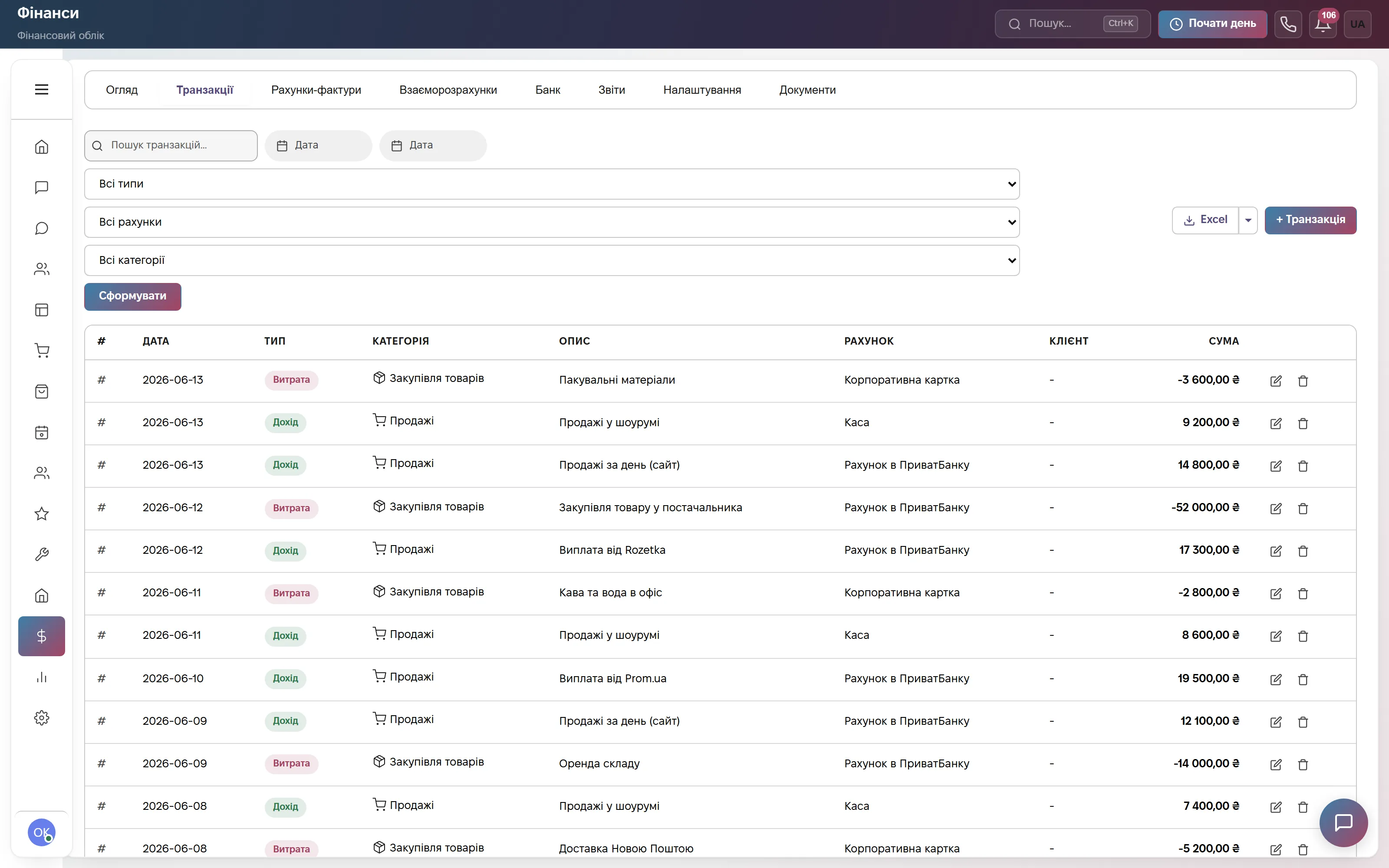
The Transactions tab in Finance: date, type (Income or Expense), category, description, account (cash desk, card, bank account), client and amount. At the top are search, filters by type, account and category, export to Excel and the + Transaction button. Next to it are the tabs Invoices, Settlements and Reports.
An invoice for an advance and for the next payment stages can be paid in parts, and Settlements shows who owes you. Recurring payments (rent, licences) are set up separately. A project budget in the Organizer is kept apart and does not go into Finance automatically. Payment and expense tracking is managerial, not statutory accounting.
Which modules to turn on
What it costs
Website chat, messengers and a three-step bot. One user, 600 replies a month. Forever, no card.
Pipeline, calls, mailings, projects and tasks, plus warehouse, orders and finance. Team of 3, then +200 ₴ for each extra user.
All modules: orders, appointments, warehouse, finance, staff, automations. Team of 10, then +200 ₴ for each extra user.
Quarterly billing is 8% off, yearly 17% off. Rozetka, Prom and Nova Poshta integrations are not charged separately.
Frequently asked questions
How much does a CRM for a construction company cost?
For the pipeline, calls, projects, warehouse and finance the Commerce plan at 900 ₴ a month per company is enough: a team of 3, then +200 ₴ for each extra user. «Everything included» is 2,200 ₴ for a team of 10 with staff and automations. Paying for a quarter gives 8% off, for a year 17% off. The first 14 days are free, no card.
Are there estimates and a Gantt chart?
No. Estimates (in ABK or Excel, for example) stay in your estimating software, and the CRM holds the finished figure: deal items and the project budget. There is no Gantt chart or day-by-day work schedule: project stages are tracked as milestones with a status, and tasks have deadlines.
Should a site be a deal or a project?
The lead and the price agreement live in a deal in the pipeline, and the work itself lives in a project with milestones, a budget and tasks. A project is not linked to a client or a deal directly; the link goes through project tasks, which can be linked to a client. Project expenses and Finance transactions are kept separately.
Can I track materials and equipment?
Materials, yes: products with SKUs, several warehouses, receipts, write-offs, transfers, reserve and minimum stock. A write-off is not tied to a particular project. There is no tracking of equipment and tools (who took what, when it came back, servicing).
Can I take calls in the browser?
Yes, if you have a contract with a SIP provider: Binotel, Zadarma, Ringostat, UniTalk, CallsApp or your own SIP server. You need a headset and Chrome or Edge. Without a connected provider the dialer opens with the Offline status. The demo has no projects, so it is better to see the project structure during the 14-day trial.
Try the demo or test it on your own data
A demo account with clients, deals, products, chats, calls and tasks, no sign-up. Or 14 days of the full plan free, no card.