CRM for small business: pay only for what you need
A small business owner rarely looks for a CRM; they look for where the client went who was promised a call back. You can start ModalCRM for free with chats and a client base imported from a spreadsheet, then add only what you really need: a pipeline, orders, warehouse, finance. The price is per company, not per user, and the base modules are in every plan.
Home: what needs attention today
Home is a to-do list, not a report. Needs attention shows overdue tasks, chats unanswered for over an hour and deals with no activity for over 5 days. Today lists active reminders. Below are four cards: Leads, Clients, Active chats, Active tasks, and a list of stalled deals with client names.
On day one it is enough to set company data and time zone, connect channels, add people with roles and set notifications. The pipeline, templates, automations and telephony can wait. The ModalCRM team can help connect channels. Sample data on a fresh account is removed in one click, and the first-login checklist suggests next steps.

Chats: every messenger in one queue
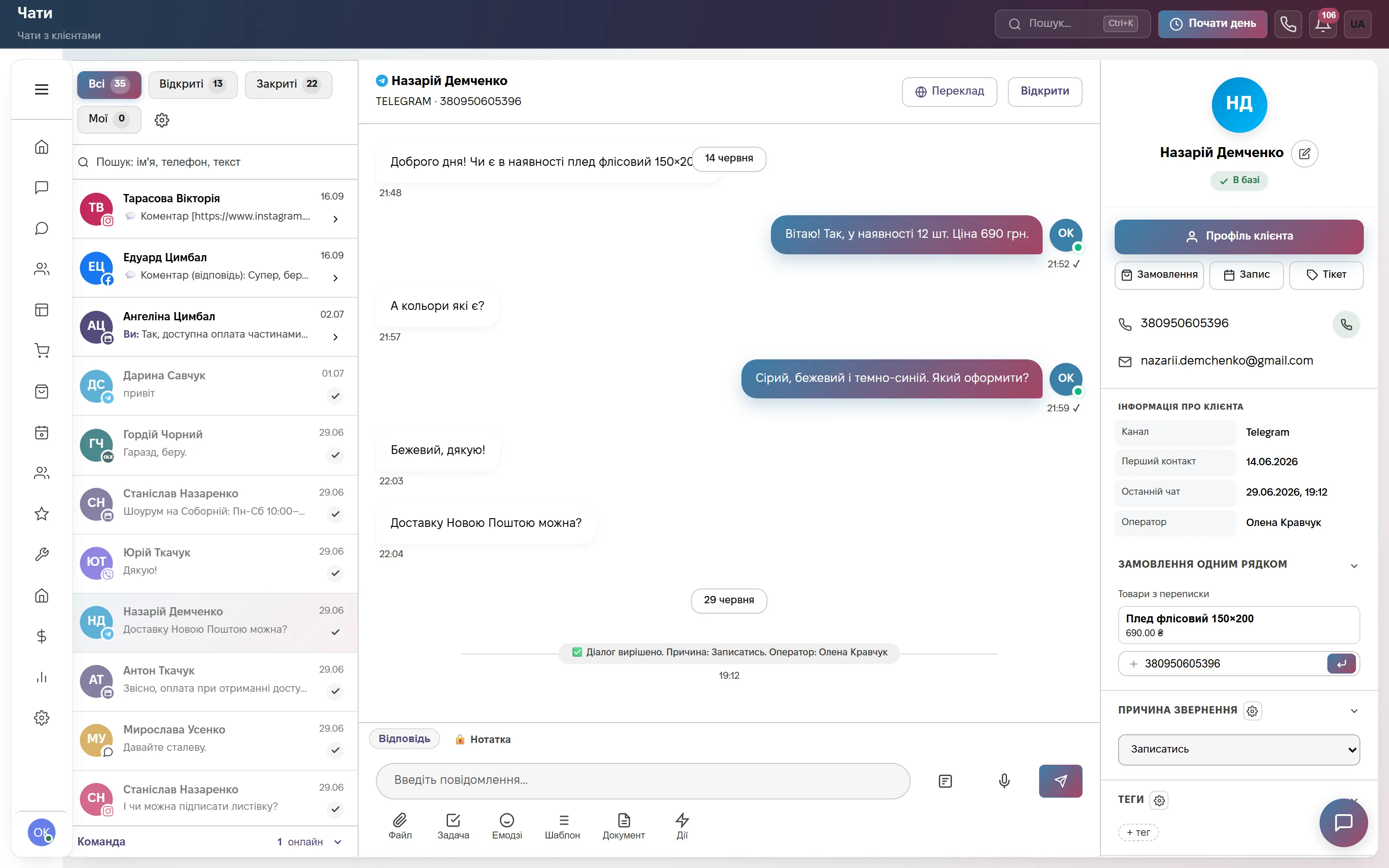
On the left is the queue with tabs All, Open, Closed and Mine. In the middle is a Telegram dialog; on the right the client card with the buttons Order, Appointment, Ticket and a Contact reason field. The dialog supports One-line order, and closing a conversation records the reason.
The website chat, Telegram, Viber, WhatsApp, Instagram and Facebook land in one window, so you do not watch six apps on your phone. The free plan already includes chats: one user, 600 outgoing replies a month and a three-step bot. There is an Android app in Google Play; on iPhone the CRM is added to the Home Screen as a PWA with notifications (iOS 16.4 and newer).
A sales pipeline that needs no setup to start
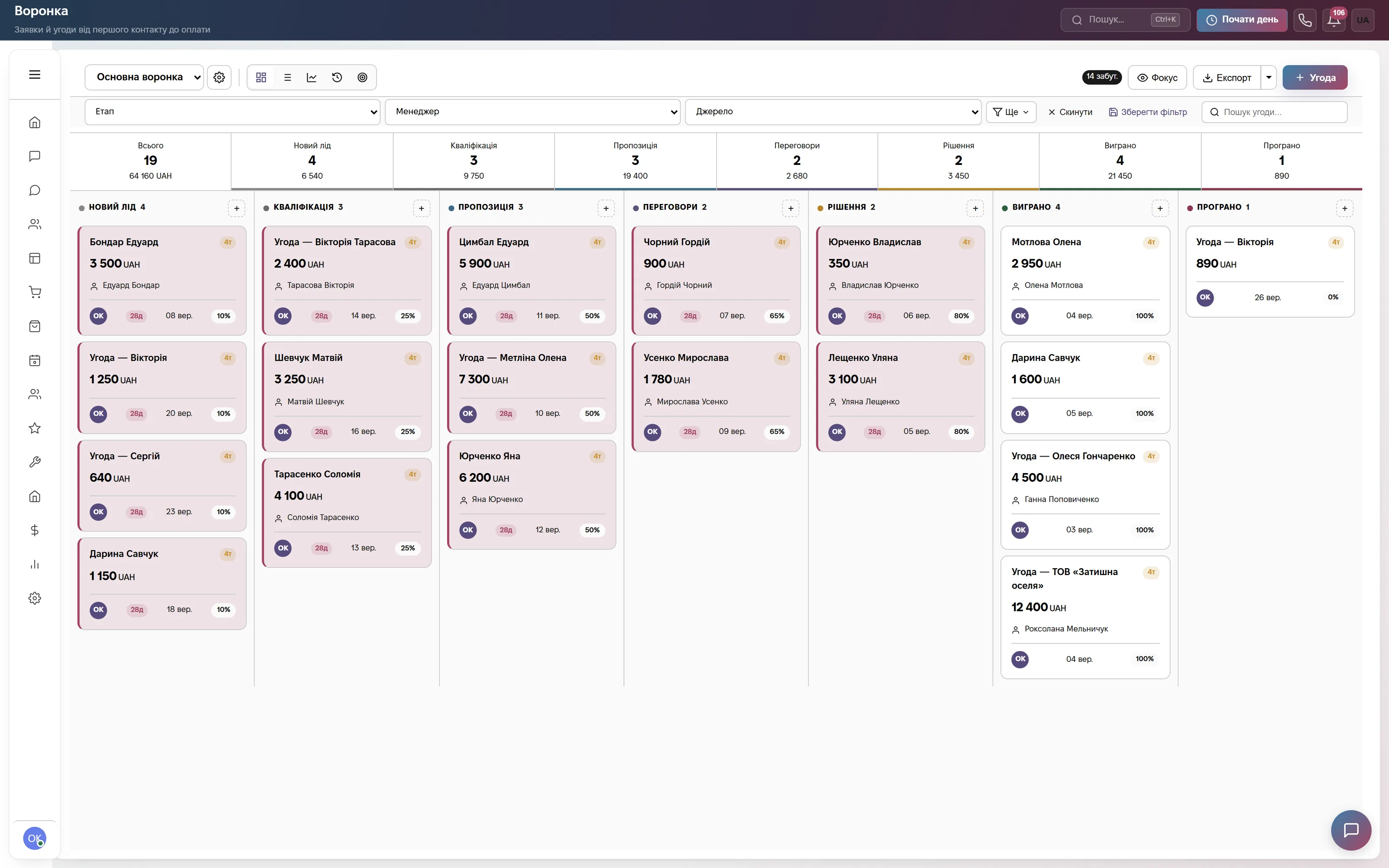
The Main pipeline comes with ready stages: New lead, Qualification, Proposal, Negotiation, Decision, Won, Lost. Above each column is the total of its deals; at the top are filters by stage, manager and source, and the Export and + Deal buttons.
A deal amount is the sum of its items, and probability comes from the stage. Stages can be renamed and, if needed, a second pipeline created, for example for repeat sales. The pipeline shows money in progress, not money received: a won deal does not create income in Finance automatically.
Orders from the website, marketplaces and phone
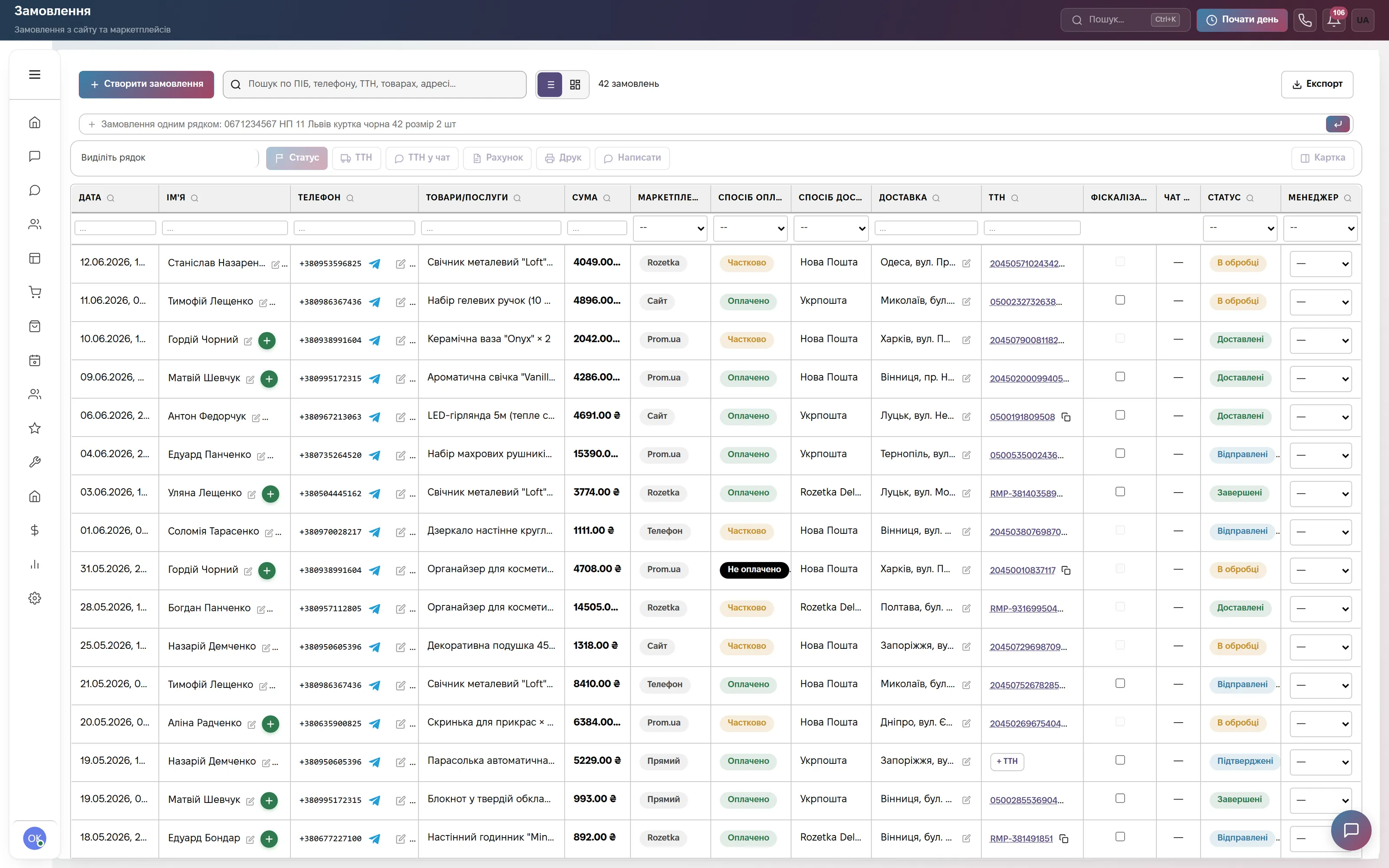
One table of orders: date, client, phone, items, amount, channel (Rozetka, website, Prom.ua, phone, direct), payment method, carrier (Nova Poshta, Ukrposhta), tracking number, fiscalization and a status from Processing to Completed. At the top are Create order and a line for quick entry.
A one-line order can be entered from a chat: name, phone, branch, item. The Fiscalization column works with Checkbox and is switched on separately. The Orders module is part of the Commerce plan and «Everything included», so if you do not sell goods you do not pay for it.
Finance: where the money went
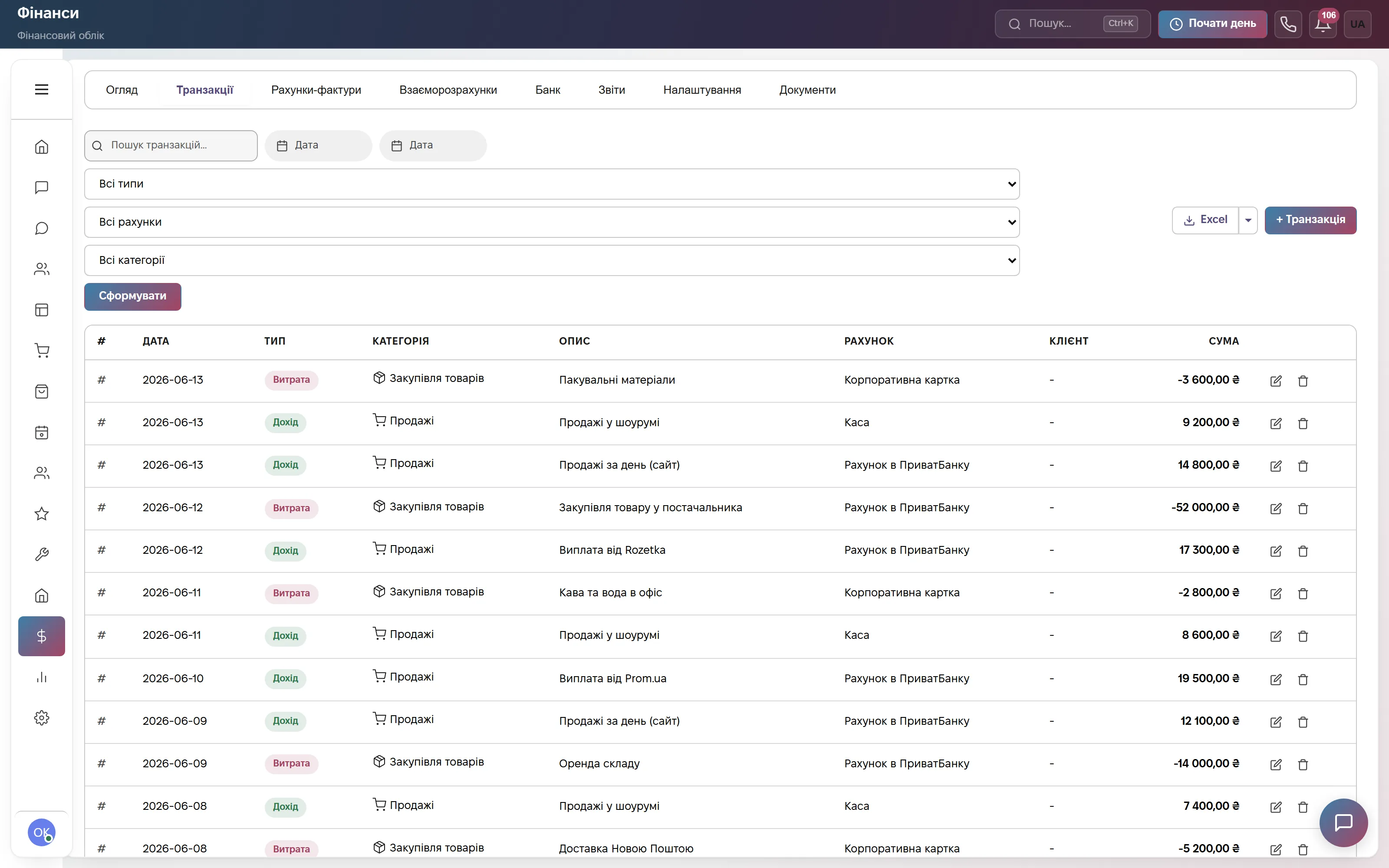
The tabs are Overview, Transactions, Invoices, Settlements, Bank and Reports. Transactions show the date, income or expense, category, description, account (cash desk, card, bank account), client and amount. At the top are search, filters by type, account and category, and export to Excel.
This is management accounting for the owner: how much came in, how much was spent, who owes. Invoices can be issued with partial payment. The module is not accounting software and does not do tax reporting. Finance is available in the Commerce and «Everything included» plans.
Which modules to turn on
What it costs
Website chat, messengers and a three-step bot. One user, 600 replies a month. Forever, no card.
Choose one of three at 900 ₴: Communication, Commerce (+ orders, warehouse, finance) or Bookings. Each has the pipeline, calls, mailings and tickets. Team of 3, then +200 ₴ for each extra user.
All modules: orders, appointments, warehouse, finance, staff, automations. Team of 10, then +200 ₴ for each extra user.
Quarterly billing is 8% off, yearly 17% off. Rozetka, Prom and Nova Poshta integrations are not charged separately.
Frequently asked questions
How much does a CRM for a small business cost?
The start is free forever: chats and one user. The paid Communication, Commerce and Bookings plans cost 900 ₴ a month per company for a team of up to 3, then +200 ₴ for each extra user. «Everything included» is 2,200 ₴ for a team of up to 10. A single module can be added to a plan for 900 ₴. Paying for a quarter gives 8% off, for a year 17% off. The first 14 days are free, no card.
Isn't a CRM too big for me? Everything is in Excel and Telegram
Start with chats and the client base and switch on the rest when you need it. On day one you only need company data, channels, people and notifications. The pipeline, templates, automations and telephony can be left alone. The interface is in Ukrainian, and in English or Russian if you prefer.
How do I move clients over from Excel?
Clients, then Import: an Excel file (.xlsx, .xls) or a UTF-8 CSV up to 10 MB, with a comma or semicolon separator. Only the Name column is required. Supported columns are last name, phone, email, company, tax ID, city, address, source, tags and notes. You map the columns yourself, phones are normalized, and at the end you see how many rows were imported and skipped. Export to Excel is open to everyone, export to CSV to administrators.
Is there a mobile app?
There is an Android app in Google Play: chats, appointments, tasks, calendar and push notifications on the same account. There is no separate iPhone app: the CRM opens in Safari and is added to the Home Screen, after which notifications work (iOS 16.4 and newer).
What does ModalCRM not do?
It is not accounting software: tax accounting, reporting and statutory HR documents stay with your accountant. Finance and Warehouse are management accounting for the owner. A won deal does not create a payment automatically.
Try the demo without signing up
A demo account with clients, deals, orders, products, chats, calls and tasks. Or 14 days of the full plan free, no card.