HR system for small business: working time and staff tracking
The accountant keeps the timesheet in one file, the manager approves leave in a chat, and everyone remembers a colleague's birthday afterwards. In ModalCRM the Staff section brings it together: employees and structure, a timesheet fed by the Start day button, leave and sick days with approval, onboarding and simple payroll. It is a manager's tool, not statutory personnel records: it does not produce orders for the pension fund or official reports.
The working day starts with a button in the header
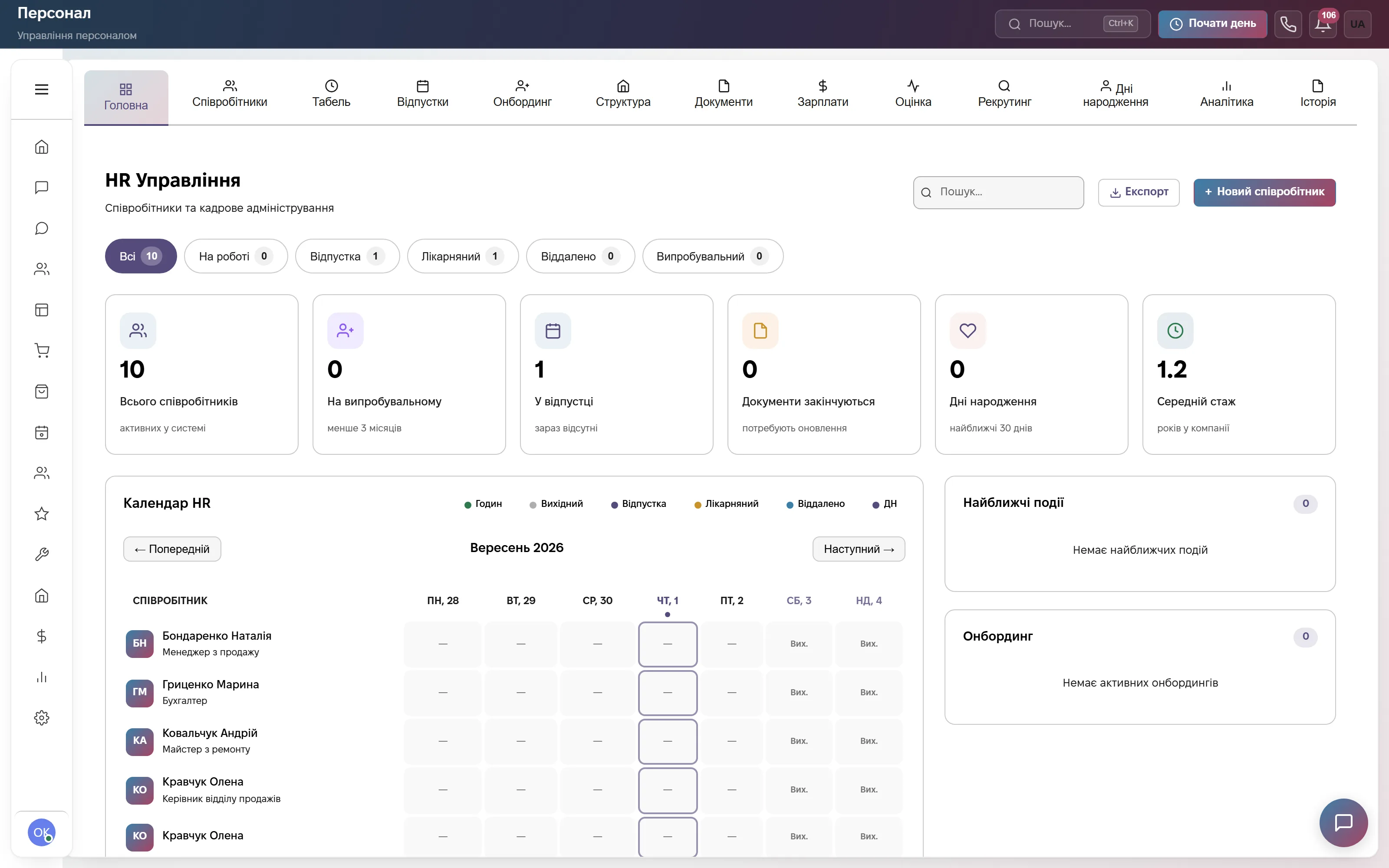
The Staff section opens on the main tab: status counters (at work, on leave, sick, dismissed, probation) and the HR calendar for the week with a legend for Hours, Day off, Vacation, Sick leave, Remote and birthdays. On the side are Upcoming events and Onboarding. The Start day button is visible in the CRM header on every screen.
An employee presses Start day, Break and Resume during the day, and End day in the evening. The timesheet is built from that: a week, a month or your own period, a filter by employee, export to Excel. Late arrivals are highlighted in orange; the start of the day and the tolerance in minutes are set in the HR settings. There is no geolocation, QR code or IP check, so it is a mark based on trust. A forgotten day is fixed manually: click the cell and press Edit.
Employees, leave and sick days
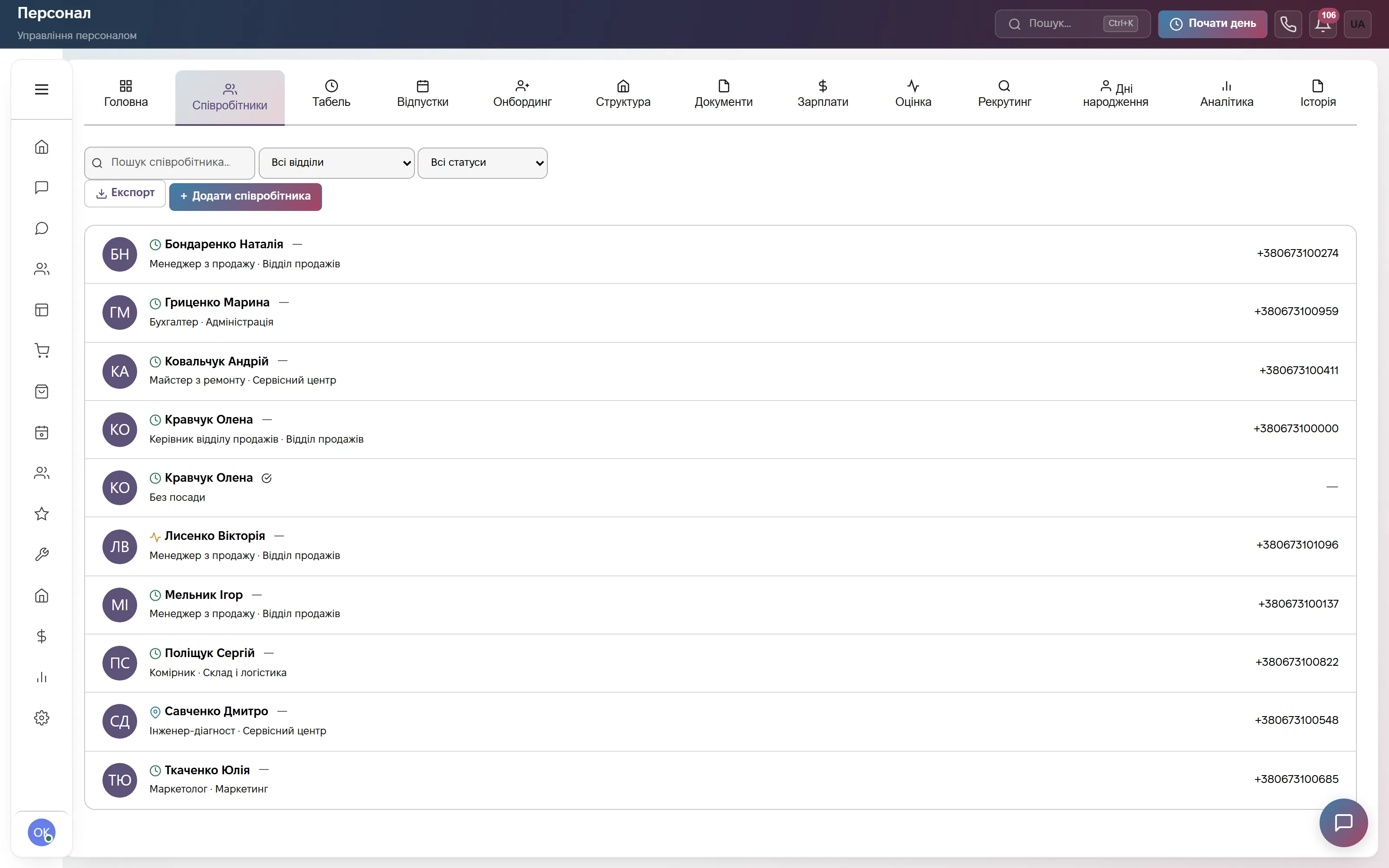
The Employees tab is a list with search, department and status filters, and the Export and Add employee buttons. A row shows the name, position with department, phone and status. The card holds the tax ID and passport, a mentor, the end of probation, a substitute for absences and the Dismiss employee action.
An employee files vacation, sick leave (with the sick-note number), unpaid leave, a business trip or study leave, and the manager presses Approve or Reject. Overlapping dates are refused and exceeding the balance triggers a warning. The balance accrues 2 days per started month, up to 24 a year. After approval the days fill the timesheet, an event appears in the calendar, and open tasks pass to the substitute and come back after the leave.
Departments, positions and simple payroll
The Structure tab shows departments with headcount and positions with a reference salary, for example 32,000 UAH. The buttons are Add department and Add position. A department can have a parent, so the company tree is built without Word tables.
In Payroll, the Calculate payroll button creates drafts for active employees: the salary from the card for the days worked in the production calendar plus a bonus, minus personal income tax 18% and military levy 5%. The 22% social contribution is shown separately as an employer cost. Then Approve all (the employee is notified with the amount), a manual Paid mark after payment, and export to Excel. This is a calculation for the manager, not tax accounting: there is no hourly pay or overtime, and the amounts do not go into Finance.

A staff report among the general Reports
Reports has a row of tiles by module: Reasons, Chats, Funnel, Orders, Clients, Finance, Staff, Warehouse and others. The screenshot shows the chat report, but the staff report opens the same way, with one click on its tile.
The staff report shows the split by status, how many people were hired in the period, a breakdown by department and the payroll fund by department (visible to managers only). The Analytics tab inside Staff shows who is at work, on vacation or sick right now. Birthdays for the next 30 days and reminders arrive as a CRM notification and an e-mail.

Which modules to turn on
What it costs
Website chat, messengers and a three-step bot. One user, 600 replies a month. The Staff section is not included. Forever, no card.
The Communication plan at 900 ₴ plus the Staff module separately at 900 ₴. Team of 3, then +200 ₴ for each extra user.
All modules including Staff: orders, appointments, warehouse, finance, automations. Team of 10, then +200 ₴ for each extra user.
Quarterly billing is 8% off, yearly 17% off. Rozetka, Prom and Nova Poshta integrations are not charged separately.
Frequently asked questions
How much does an HR system for a small business cost?
The Staff section is included in the «Everything included» plan at 2,200 ₴ a month (team of 10) or can be added to any paid plan for 900 ₴. The price is per company: a team of 3, then +200 ₴ for each extra user. Employees without CRM access (drivers or workers, for example) do not count toward the limit. Paying for a quarter gives 8% off, for a year 17% off. The first 14 days are free, no card.
Is this statutory HR record keeping?
No. ModalCRM does not keep statutory personnel records: it does not file reports to the pension fund or the tax office, does not pay social contributions or income tax, and does not replace an HR officer or an accountant. You can generate a hire or leave order from a template, but official records stay where you keep them now.
How is payroll calculated?
It is a simple monthly statement: the salary from the employee card for the days worked in the production calendar, a bonus, personal income tax 18% and military levy 5%; the percentages can be changed with the Formula button. The 22% social contribution is shown separately as an employer cost. There is no hourly pay or overtime, payment is marked manually, and the amounts do not go into Finance automatically.
How do you check that a person is really at work?
The employee presses Start day and End day, and the manager sees it in the timesheet and in the Who is at work now block. There is no geolocation, QR code or IP check, and no limit on breaks. A wrong mark is corrected by the manager in the timesheet.
Where is employee data stored?
On servers in Europe (Hetzner). The provider is sole proprietor Viktoriia Lazukina, Ukraine; terms are in the public offer on the website. Access to the Staff tabs and to payroll follows role permissions, and the change log is visible to administrators only.
See the Staff section live
A demo account with employees, departments, clients, deals and chats, no sign-up. Or 14 days of the full plan free, no card.