CRM for a sales department
A head of sales finds out about a lost deal when it is already too late. A deal sits on «Suggestion» for a week, the manager forgot to call back, and the spreadsheet shows nothing. In ModalCRM everything sits in one pipeline: stage, amount, owner, time since the last action, recorded calls and the conversation. The head sees the picture without interrogating the team.
Pipeline: every deal of the team on one screen
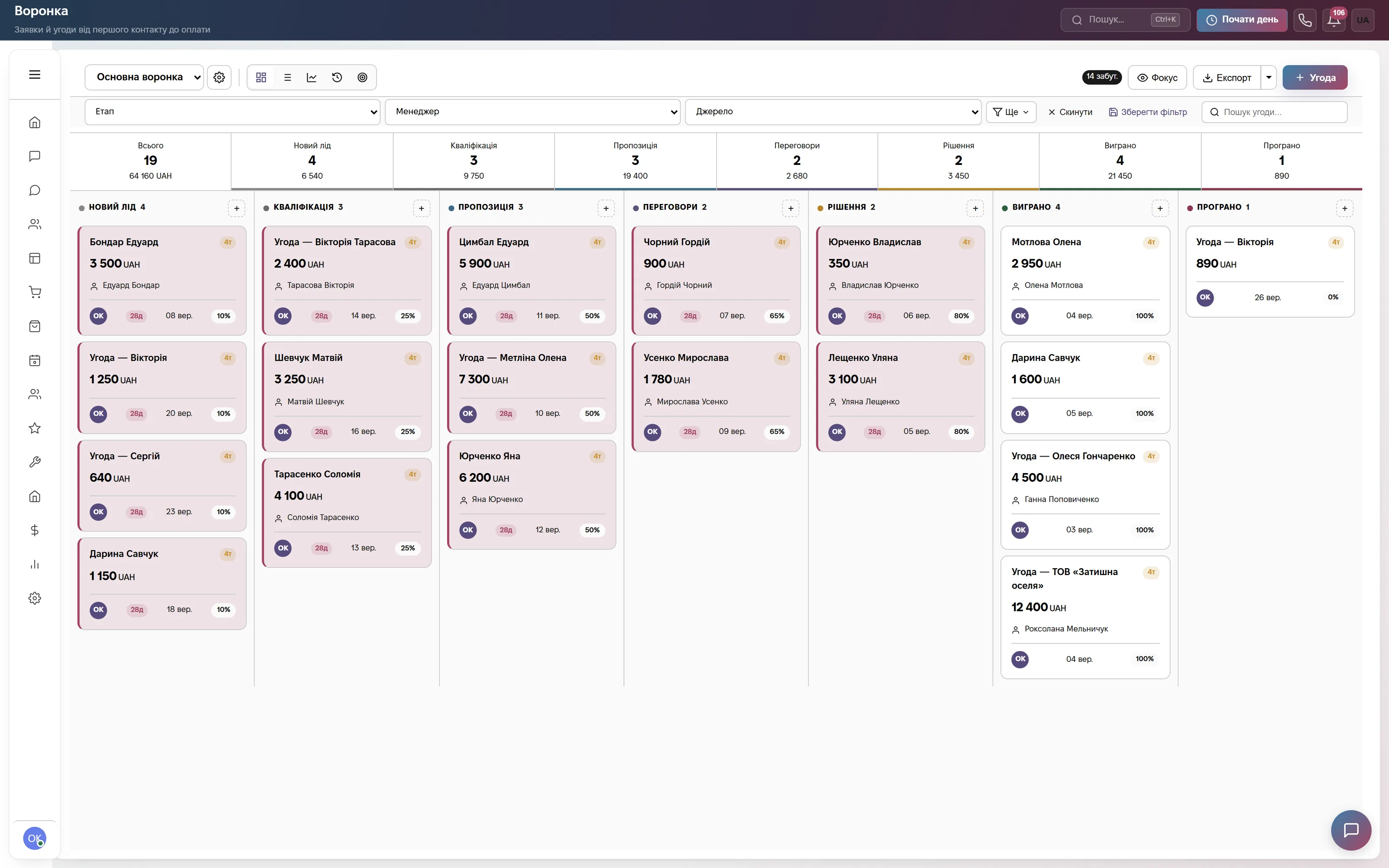
A kanban board «Main pipeline» with the stages New lead, Qualification, Suggestion, Negotiation, Decision, Won, Lost. Each stage header shows the number of deals and their total; a card shows the amount, contact, manager initials, date and probability. Deals are dragged between stages, and the Stage, Manager and Source filters narrow the screen to one manager or one channel. A saved filter opens in one click.
«Focus» hides closed deals, «Export» sends the selection to Excel or CSV. If you sell in several directions, «Manage Pipelines» lets you create separate pipelines with their own stages. Colleagues see changes on the cards right away, with no page reload.
Deal list for the weekly meeting
The same deals as a list: Name, Stage, Amount, Contact, Manager, Close date, Created. It is a convenient way to go manager by manager at the meeting: filter one person, sort by expected close date and see what should close this week and what is already overdue.
An open deal card has the tabs Overview, Activity and History: who changed the stage or amount and when. From there you set a task, a reminder and a calendar event, or send a document. A loss is not closed silently: a reason and a comment are required, so the team sees where it loses money.

Home: what is on fire right now
The «Needs attention» block collects problems: overdue tasks, chats without a reply for over an hour, deals with no activity for over 5 days. Below is the «Deal stuck» feed with the client name, days without an update and the amount. It is a ready agenda for a conversation with a manager.
On deal cards a yellow badge appears after 5 days without movement, a red one after 14. Every morning at 08:20 a morning digest arrives: what closes today, which deals have stood for over 7 days, what was won yesterday. CRM creates reminders to managers on proposals and negotiations, and stalled negotiations are escalated to the company admins.

Reports by pipeline, manager and source
In «Reports» the «Pipeline» tile opens an overview, the sales funnel, and the By managers, By sources and Conversion views: total, average deal, a forecast weighted by stage probability, average time per stage, loss reasons. The screenshot shows chat analytics: where requests come from and how many are still open.
The «Team» tile shows a leaderboard for 7, 30 or 90 days: calls, answer rate, talk time, won deals and revenue, completed and overdue tasks. For targets there is the «Sales goals» tab: a goal for revenue, won or created deals, calls or meetings per week, month, quarter or year, for one employee or the whole company. Progress is calculated automatically.

Managers' calls with recordings
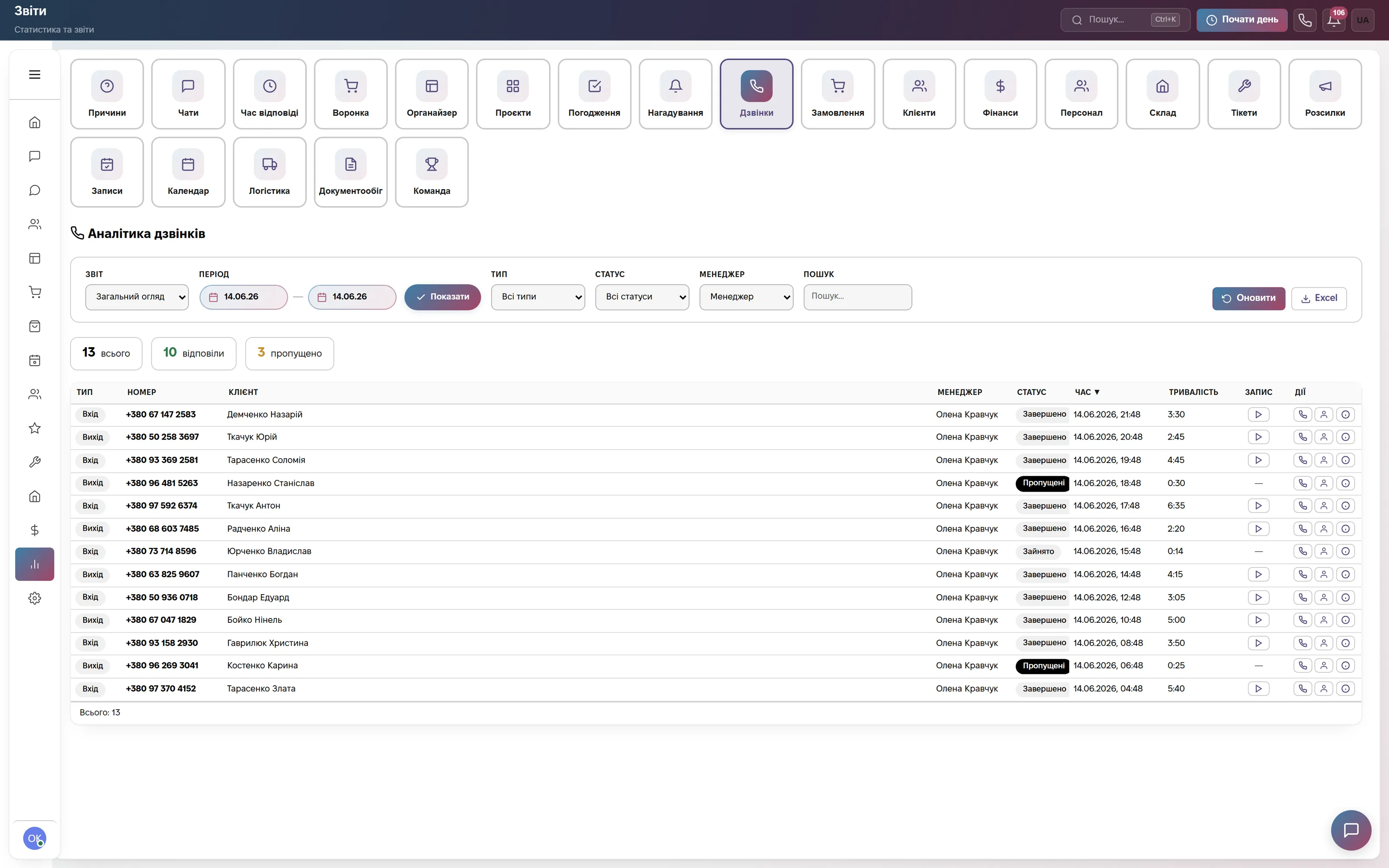
«Call analytics»: total calls, answered, missed; the log lists type, number, client, manager, status, duration and a play button for the recording. Reports by operators, the longest and missed calls help you check whether managers really call and listen to a problem conversation. A recording exists if your SIP provider enables it.
A missed incoming call turns into a «Call back» task with a two-hour deadline. During a conversation you can create a deal, a lead or a task from the call card. Calls go through Binotel, Zadarma, Ringostat, UniTalk, CallsApp or your own SIP server, and managers call from the browser.
Which modules to turn on
What it costs
Site chat, messengers and a three-step bot. One user, 600 replies a month. Forever, no card.
Deal pipeline, browser calls, chats and messengers, broadcasts, tickets, documents, reports and sales goals. Team of up to 3, then +200 ₴ per extra user.
All modules: also automations (for example, a notification to the new manager when the owner changes), orders, warehouse and finance, bookings, HR. Team of up to 10, then +200 ₴ per extra user.
Quarterly billing is 8% off, yearly 17% off. Rozetka, Prom and Nova Poshta integrations are not charged separately.
Frequently asked questions
Can I restrict managers from seeing other people's deals?
Yes. An employee role sets deal visibility: «Own only», «Own department» or «All». It applies to lists, search and reports, and a manager with «Own only» cannot open someone else's deal even by a direct link. Custom roles are created in Settings → Team.
How much does a CRM for a sales department cost?
The «Communication» plan is 900 ₴ a month for a company of up to 3 users, each extra user +200 ₴. It includes the deal pipeline, calls, chats, reports and sales goals. For a team of up to 10 there is «Everything included» at 2 200 ₴. Paying for a quarter saves 8%, for a year 17%. The first 14 days are free, no card.
Can I migrate a base from another CRM or from Excel?
Yes. Contacts and deals are imported from Excel or CSV, and we help with migration from Bitrix24, KeyCRM, AmoCRM, HubSpot and others for free. After the import, adjust the pipeline stages to your process and invite managers: each employee sets their own password via the link in the email.
How does the head of sales control the plan per manager?
The «Sales goals» tab sets a goal for revenue, won or created deals, calls or meetings, per week, month, quarter or year, for an employee or the whole company. Progress is calculated automatically from deals and calls; an employee sees their own goal, the head sees everyone's. This is a goal and actuals, not a bonus calculator: ModalCRM has no interface for sales commissions.
Does the CRM distribute new leads between managers automatically?
No. Even distribution by queue works only for incoming calls between operators who are on the line. Managers take leads and chats with the «Assign to me» button or receive them via «Transfer» from the head. There is no lead scoring either: priority is defined by the pipeline stage and the probability you set.
Build your team's pipeline in one evening
Import contacts and deals, set up the stages, and tomorrow at the meeting look at one pipeline instead of three spreadsheets. 14 days of the full plan free, no card.