Everything your chat can do
A widget on your site, six messengers, a bot and calls — in one window. Below, in detail: what the operator sees, what the customer gets and what stays in your database after the conversation.

One inbox instead of eight tabs
Messages from every channel land in a single stream. You can see who is already replying, who nobody has answered yet and how long the person has been waiting.
You see who is replying
The operator sees a colleague already took the conversation — no two people sending the same customer different answers.
Nothing gets lost overnight
Someone wrote at 3 a.m.? In the morning the conversation is in the stream, tagged with how long they have been waiting.
Telegram notifications
The first message reaches you in Telegram — you do not even need the app open.
One line of code and the chat is live
No plugins, no developer: copy the snippet from the Integrations page and paste it before the closing head tag. WordPress, Tilda, OpenCart, custom-built — any site.
-
Online and offline in oneOperator available — live chat; nobody around — a request form. Nobody writes into the void.
-
Working hoursThe widget shows "online" only when you really are — based on your schedule and operator presence.
-
Matched to your brandColour, header name, greeting, promised reply time — all from the CRM, with a live preview.
-
Files, emoji, statusesPhotos and documents up to 100 MB, an "operator is typing…" indicator and read receipts.
<script src="https://modalcrm.com/js/chat-widget.js"
data-key="ваш-ключ"
data-url="https://modalcrm.com"></script>
While you are around
A live chat: the bot greets and suggests topics, and an operator picks up anything harder.
While you are offline
The widget turns into a form: the visitor leaves a contact and the request waits in the CRM.
While the chat is closed
A greeting bubble with an unread counter stays in the corner of the site.
The bot is on duty when you are not
Build the script from blocks with your mouse: greeting, answers to common questions, contact collection. The same bot works in the widget and in Telegram.
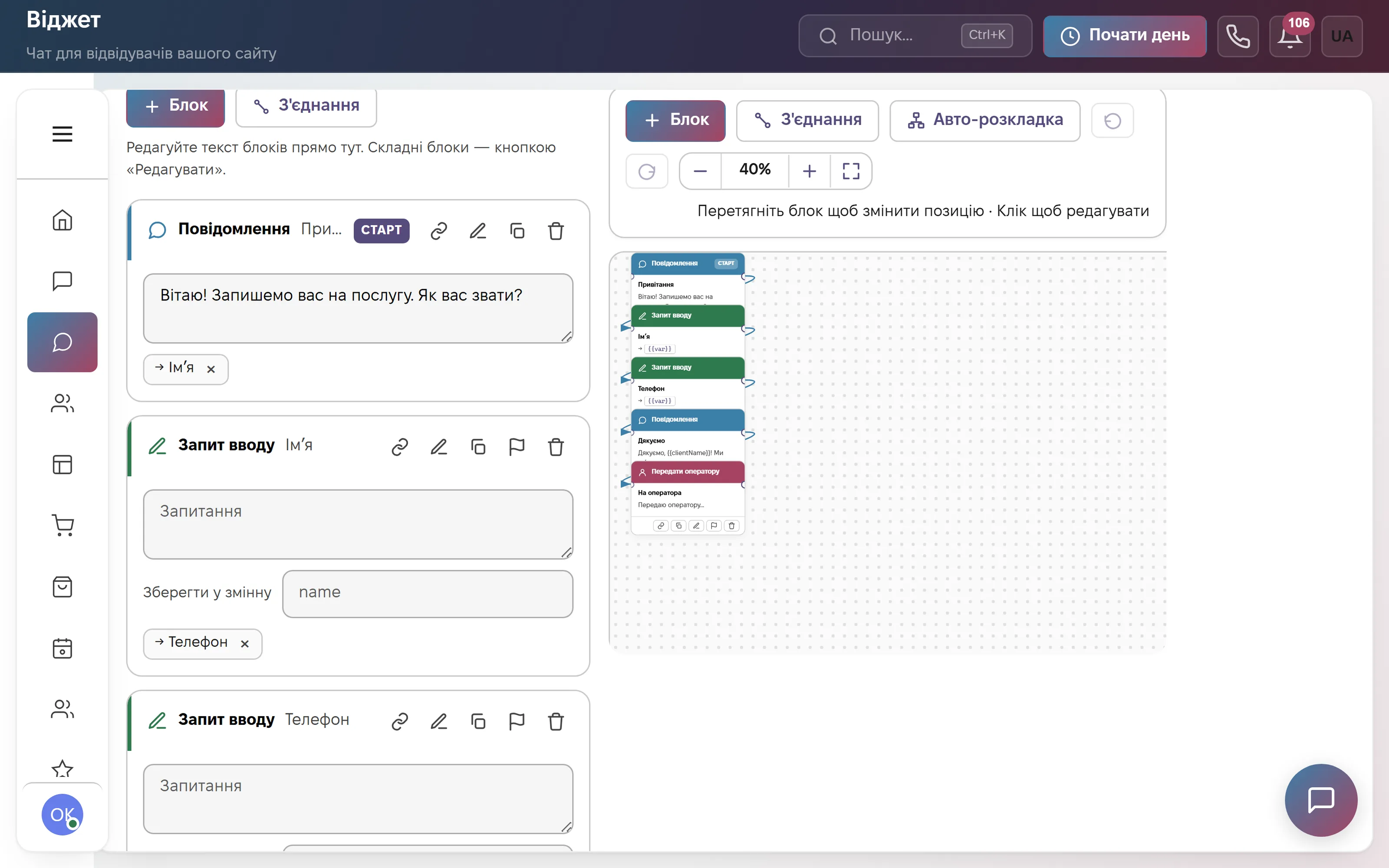
No code — blocks and arrows
Drag, connect, save. Auto-layout tidies the canvas for you.
Test chat before launch
Click through the script yourself before customers ever see it.
A real question goes to a real person
The bot is not a dead end: anything complex is handed to an operator together with the full history.
Everything in one window
The operator never switches apps: templates, files, translation, handover and customer actions all live inside the conversation.
Quick reply templates
Standard answers in two clicks. New operators write like the experienced ones.
Automatic translation
Incoming messages are translated into your language, your reply reaches the customer in theirs. The original is always one click away.
Hand over to a colleague or to service
The conversation moves to another operator with its history, or becomes a service ticket with the same text.
Reason for contact is mandatory
When closing a conversation the operator picks a reason: "wants to buy", "complaint", "payment problem". That is what the analytics are built from.
Media in any format
Photos, video, audio, documents, links — accepted from every channel and kept in the history.
The "Resolved" button
The conversation closes with a system message and moves to the archive — the stream does not fill up with old threads.
Calls straight from the browser
No separate desk phone and no manager's personal mobile. An incoming call rings every free operator; the conversation and its recording land on the client card.
-
Call from anywhereFrom the client card, an order or the conversation itself — no extra tabs.
-
The call card is a mini CRMDuring the call the manager creates the order right from the card, without searching the database.
-
Recordings in the historyEvery call is stored on the client card and can be replayed at any time.
-
Your provider works tooBinotel, UniTalk, Zadarma, Ringostat and others connect to the same system.
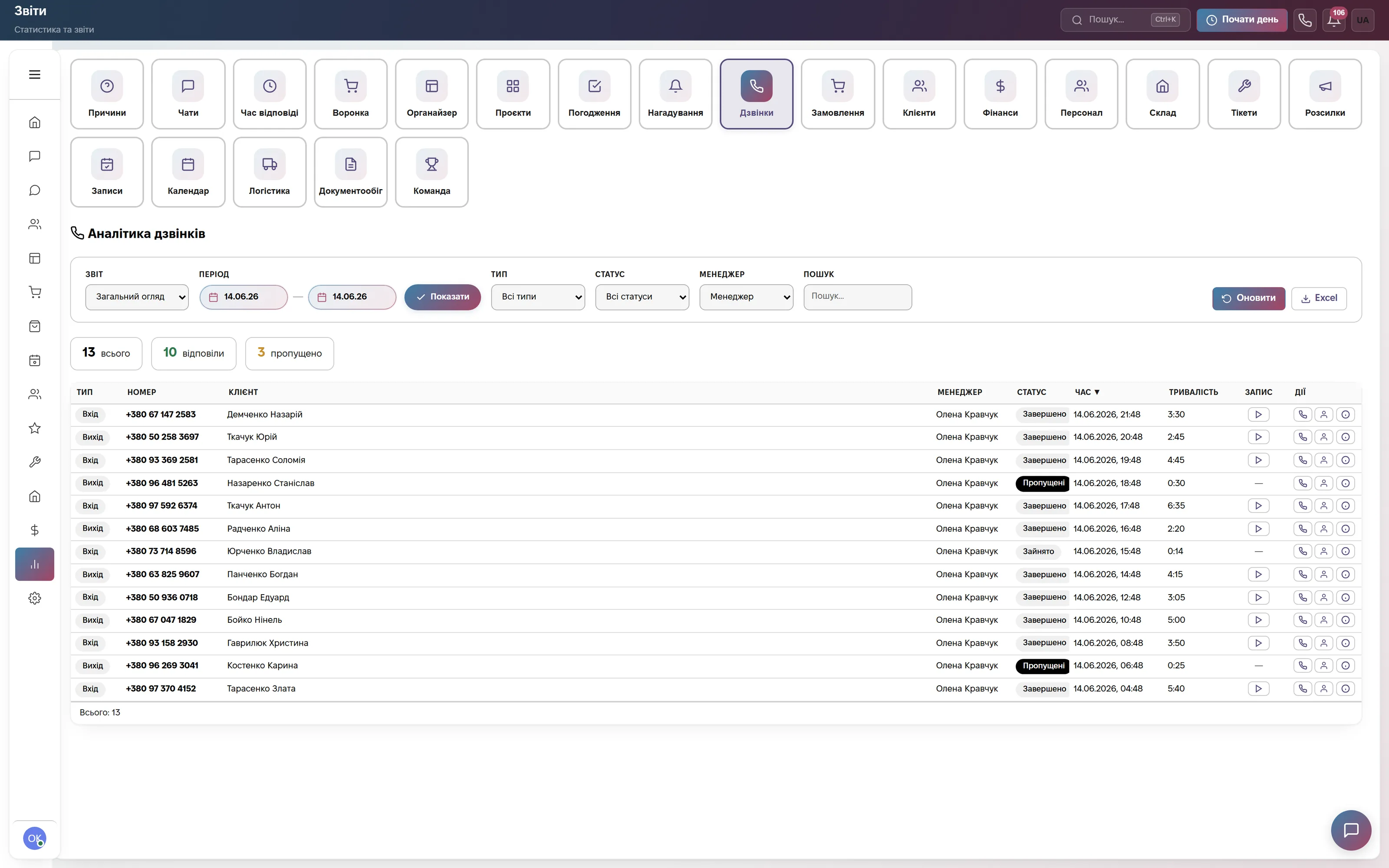
The chat ends, the customer stays
In an ordinary widget the conversation goes to an archive. Here it lands on the client card — so next time you can see what you discussed last year.
Every enquiry in one history
Wrote in the widget, then on Telegram, then called — all on one card instead of three windows.
You see which ad brought them
Someone clicked an ad and wrote — the card holds the campaign and the keyword. Not "how many clicks", but "which of them wrote".
Chat data goes to the card
Phone, email, channel and a note for colleagues are added from the conversation — nothing to retype.
Promises are not forgotten
You said "I'll call back on Thursday" — it becomes a task and the customer joins the call-back queue.
You can see why people write to you
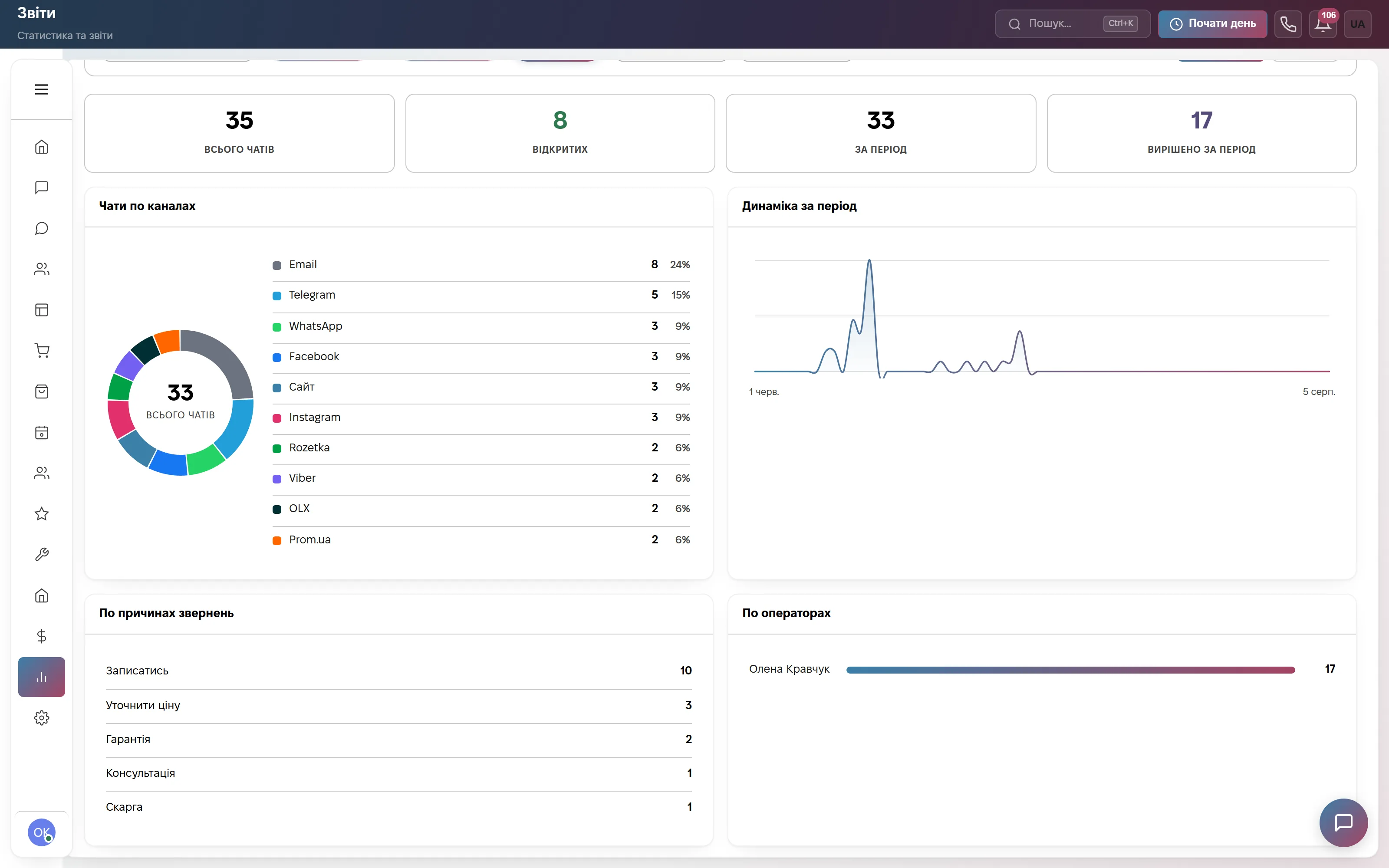
The reason an operator picks when closing a chat rolls up into charts: top topics, channels, trend over the period. You remove the cause instead of firefighting the same requests every day.
-
Top reasons for contactYou see exactly what to fix in the product, the delivery or the description.
-
Split by channelWhich messenger or marketplace brings the most — Telegram, Instagram, OLX, Rozetka.
-
Who answers how muchConversation counts and reply speed for each operator.
Work from the app you already keep open all day
Link your own Telegram and client messages land there. You reply to the forwarded message, and the client gets your answer in their own channel: the website widget, Viber, WhatsApp or Instagram.
Linking with no tokens or codes
In settings you press "Connect Telegram", the bot opens, you press Start — done. The link is single-use and lives for 10 minutes.
A reply in Telegram reaches the client
Reply to the forwarded message and the answer goes out through the channel the client wrote from. They neither know nor need to know you are in Telegram.
Or a shared group with topics
Instead of a private chat you can link a forum group: every conversation becomes its own topic and the whole team sees it together.
You choose what pings you
Chats, tasks, missed calls, reminders, approvals, tickets, orders — each one is a separate checkbox. Telegram is off everywhere by default.
Buttons right inside the notification
"Done", "In progress", "Snooze" — pressed straight in Telegram, no need to open the app.
Task, reminder, meeting — from the same window
"remind me tomorrow at 10 to call Petrenko" becomes a reminder. "meeting Thursday at 3 with @colleague" becomes a calendar event with the attendee and an invite.
Notifications and replies to clients work on the free plan too. Bot commands and creating records by text are on paid plans.
AI will not sit down and do the work for you. The routine, though, can be taken away
It feels like switching AI on will make everything crisp and fast, as if the team gained another employee. But once you break your own processes into steps, what you actually need turns out to be different: the client should be created on its own, you should see what they came for, an order should be placed in a single line straight from the conversation, and a reminder or meeting should be set from the app you already sit in all day. That is not magic — it is configuration around your habits. And it is not metered in tokens.
An order in one line
"0671234567 NP 11 Lviv black jacket 2 pcs" — the system parses the phone, carrier, branch, city, product and quantity, then shows a card to confirm. No columns to fill in; the product comes from your own catalogue.
The client is created on its own
Web form, online booking, an order from your site or a marketplace — the contact appears in the base with no typing and is not duplicated by phone. From a chat it takes one operator click.
A lead from Telegram in plain text
Write "0671234567 Olena, asked about installation" to the bot and the contact is in the base. No commands, no forms, no switching to the app.
You see what people come for
The reason an operator picks when closing a conversation rolls up into charts. You remove the cause instead of answering the same thing every day.
24 trigger events, 13 step types
Deal created, stage changed, order received, deal stuck, client birthday, abandoned cart, a daily schedule. Steps: condition, delay, approval, task, email, SMS, messenger, notification, reminder, change owner, move stage, update field, webhook.
No credits, no run counter
As many scenarios as you set up, that many run. We do not sell token packs and we do not count executions. A scenario does the same thing every time — unlike a model, which answers a little differently each run.
There is AI in the system too — the daily company briefing and the copilot — also with no credits to buy, and you can plug in your own provider key. The Automations module comes with the higher plans or switches on separately.
Add the chat today — the rest switches on later
Start with the free chat for one operator. When there are more conversations than people, orders, bookings, stock and finance switch on inside the same account.