CRM for a beauty salon
Bookings in a notebook or a Google sheet, reminders by phone call the night before — that's a typical day for a beauty salon, barbershop or cosmetology room with only a few clients. ModalCRM keeps bookings in one shared calendar: every master has their own schedule with free slots, clients can book themselves through an online booking page, and reminders go out by messenger or SMS without the administrator lifting a finger. The Bookings plan is 900 ₴ a month per company, not per master.
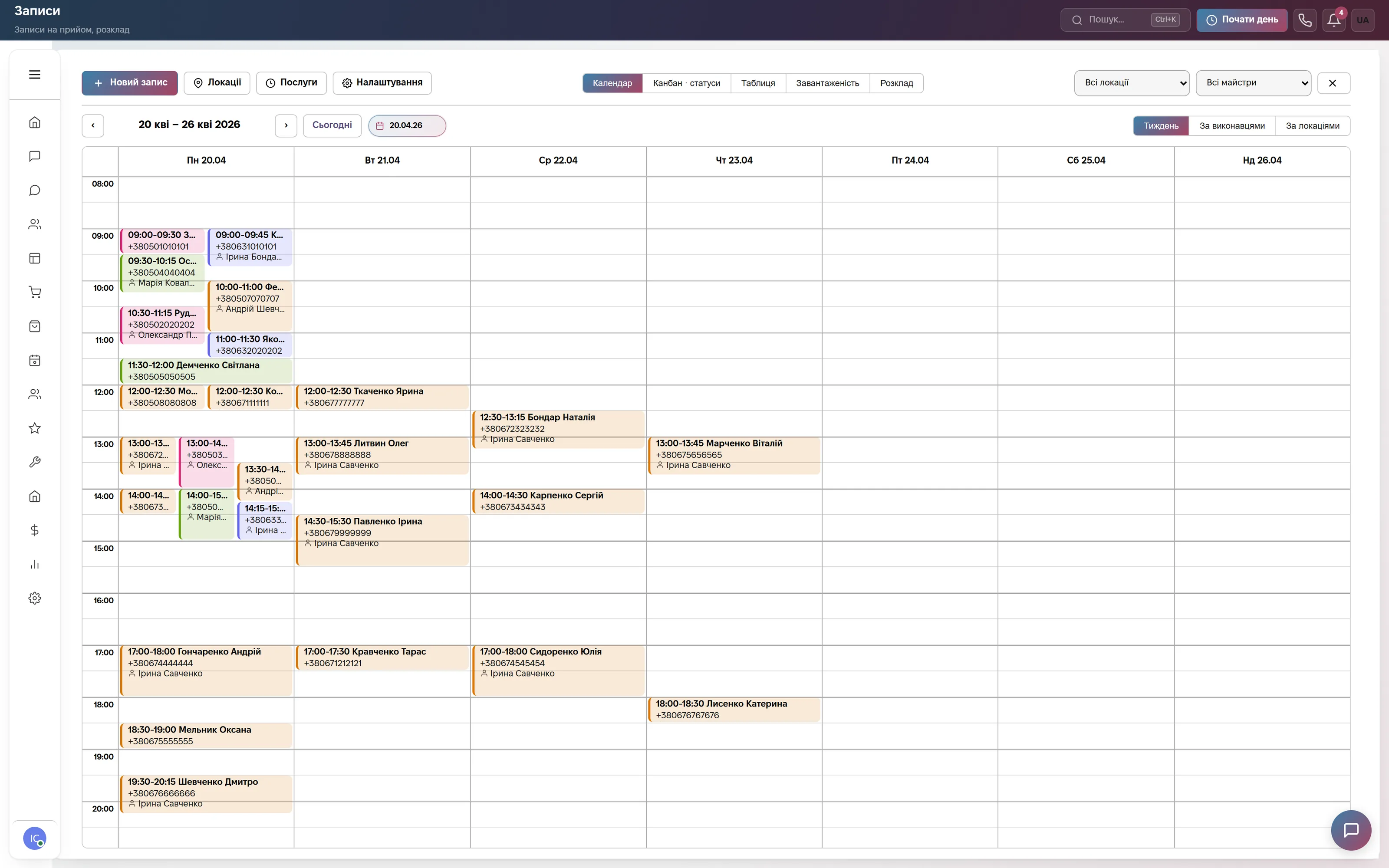
Client bookings by time and master — a week at a glance
The booking calendar shows a full week at once: each booking carries the client's name, phone number and master, color-coded by status. The "All locations" and "All masters" filters narrow the view to one branch or one specialist, and the tab bar switches instantly between calendar, kanban by status, table, workload or schedule.
The "+ New booking" button opens a form with service, duration and master: CRM suggests free slots itself, accounting for the master's schedule, breaks and existing bookings, and settings let you add a buffer between visits so a master is never booked back-to-back. "Locations" and "Services" are separate registries: several branches, and services with duration and price variants, for example a 60- or 90-minute manicure.
Each master's schedule and workload
The "By master" view lays the day out in columns, one per master. A legend explains right away why a slot is unavailable: break, vacation, sick leave or day off — CRM will not offer those hours when a client searches for a free slot.
The "Workload" tab shows which masters are fully booked and who still has free hours — handy when an administrator is spreading new bookings across several specialists. Each master's working hours, days off and vacations are set separately in the "Schedule" tab.

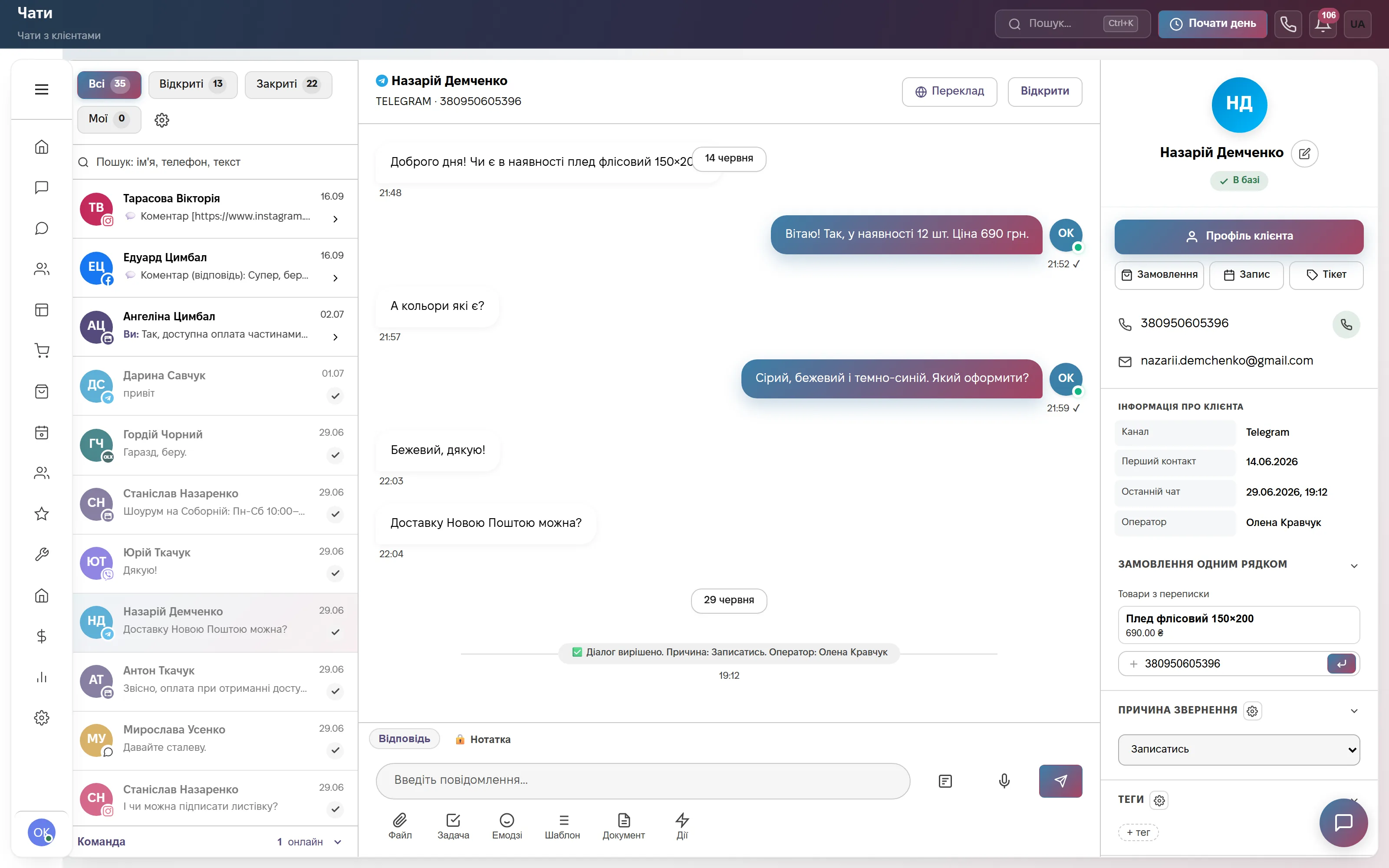
Confirmation in a messenger, not by phone
A client writes on Telegram, Instagram, Viber or the site chat — the conversation sits in the same window as bookings. On the right is the client's card with contact details and "Order", "Booking" and "Ticket" buttons: the operator creates a booking straight from the chat, the phone number is pulled from the conversation, and the contact reason can be set to "Book an appointment".
The reminder carries a link to the client's own booking page — they can view, cancel or reschedule the visit there themselves, no phone call to the administrator and no login required.
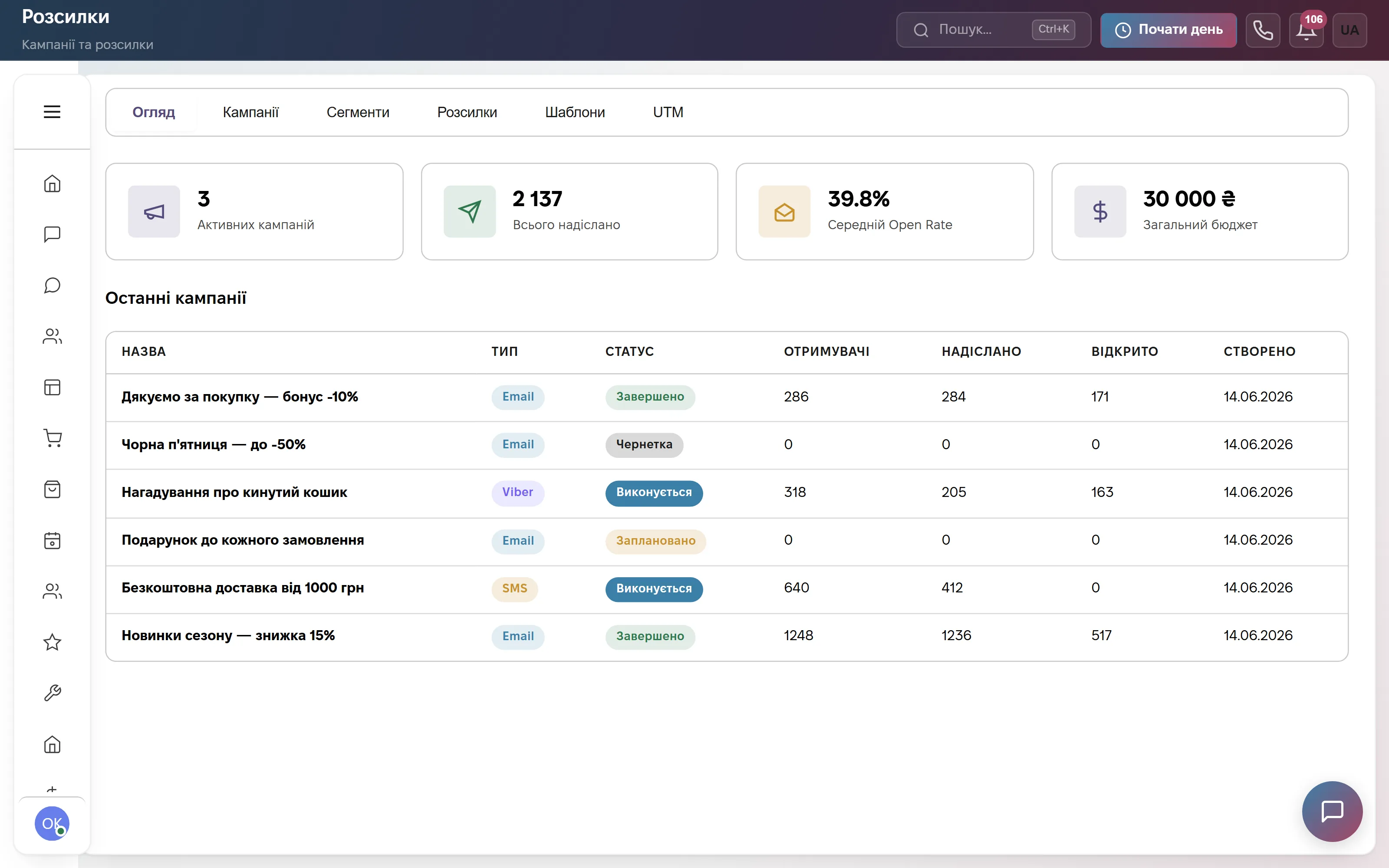
Campaigns and birthday greetings
"Campaigns" is a separate section for Email, Viber or SMS campaigns: each one shows who it was sent to, how many opened it and the budget spent. Clients can be segmented by tag, city or birthday month — a birthday greeting with a promo code as its own segment, for instance.
Campaigns are built in the "Campaigns" tab, segments in a separate rule builder, and "Templates" save time on routine texts. Campaigns and segments live in the same menu as bookings and chats.
Reports: what each master earned and which service sells best
"Reports" has its own "Bookings" tile: a breakdown by status (completed, cancelled, no-shows), by service, revenue per master and revenue per location — useful for comparing branches or working out a master's commission.
Next to it is chat analytics and the rest of the sections: clients, finance, calls, team. The bookings report, like every other report, exports to Excel in one click.

Which modules to turn on
What it costs
Site chat, messengers and a three-step bot. One user, 600 replies a month. Forever, no card.
Online booking via a link, staff schedules and Telegram reminders, plus chats, calls, a pipeline and broadcasts. Team of up to 3, then +200 ₴ per user.
Every module: adds orders, warehouse, finance, tickets with a client portal, HR and automations. Team of up to 10, then +200 ₴ per user.
Quarterly billing is 8% off, yearly 17% off. Rozetka, Prom and Nova Poshta integrations are not charged separately.
Frequently asked questions
Can a client book an appointment online by themselves?
Yes. The company gets its own online booking page that you can share as a link on Instagram or embed on your website: the client picks a service, a master (or "any available", if you allow it) and a convenient time, and the booking appears in the salon's calendar right away.
How much does CRM for a beauty salon cost?
The Bookings plan is 900 ₴ a month per company for up to 3 users, +200 ₴ for each additional one. Quarterly billing is 8% off, yearly 17% off. The first 14 days are free, no card.
Does it work for several masters, branches or a barbershop?
Yes. Each master has their own schedule and service list, there can be several locations, and "Workload" shows who's free and who's fully booked. The same tool works for a barbershop, a nail or brow studio, or a cosmetology room.
How do booking reminders work?
The reminder goes to the messenger the client already uses to talk to you (Telegram, WhatsApp, Instagram, Facebook), or by SMS or Viber broadcast through an SMS provider — at a time you set in settings, for example a day before and again 2 hours before the visit. It includes a link the client can use to reschedule or cancel.
Where is the salon's data stored?
On servers in Europe (Hetzner). The provider is sole proprietor Viktoriia Lazukina, Ukraine; the terms are the public offer on the website.
See it on live data
A demo account with bookings, chats and clients — no sign-up. Or 14 days of the full plan free, no card.